Suspicious activity has been observed on the phone of a user who was contacted by CASTEM. CASTEM allegedly asked the user to update Chrome on their iOS phone, but the user did not properly copy-paste the malicious URL, so they were not compromised. Nevertheless, an investigation is needed to understand the attackers’ infrastructure and their modus operandi.
To validate the flag you need to gather:
- The SSID the user was connected to
- The URL the user should have typed directly into their browser
- The name of the AS hosting this URL/IP
- The family of the delivered malware
Flag example: interiut{BBOX 1111:monctfpref.fr:cloudflare:pegasus}
For this forensics challenge, we are given an iTunes backup folder.
Analysis
Backup structure
The folder is structured as follows:
 1$ tree
 2.
 3├── 033dffb4beafa4daa8ffe7e00c5426b38889e060
 4│   ├── 00
 5│   │   └── 00fd0bb48de5532cc09363c12571a090316205f5
 6│   ├── 01
 7│   │   ├── 012707a2ae34d77a28b16a9e443b780ea4e6b0aa
 8│   │   └── 01a14737bf725839e60201704f5e0447e23800a6
 9│   ├── 02
10│   │   └── 02dcc29d169dda989f3402fe07d8b6526d6fb1ac
11│   ├── 03
12│   ├── 04
13│   │   └── 04ec47c2b38b390219c2c7f245f76f2afb948a1e
14│   ├── 05
15│   │   ├── 051b560a86376b4644f8bc51d4a7cb41207478da
16│   │   ├── 05575c8bd920efae4ffc54c0e25e9981952c5ec2
17│   │   ├── 056e8db520405669943b7acac46f1af2354fa0ba
18│   │   ├── 059a3fed6d5ccc69ca5d214766d91eb2964787ef
19│   │   └── 05fc8de89f9a5c214ca28aedfc4e669f92f91ab1
20[...]
21│   ├── 9e
22│   │   ├── 9e1b3356b10ac38436206af45e16ee1e33469647
23│   │   ├── 9e589bea48c0cd3b1c324b5d88eb070d23ed805b
24│   │   ├── 9e7b521f0e73ad31dddc91aedaeb775a2c34fccb
25│   │   └── 9ec3b0886ef6ebd8e58dab34c4c69ea37fc92d81
26│   ├── 9f
27│   ├── Info.plist
28│   ├── Manifest.db
29│   ├── Manifest.db-shm
30│   ├── Manifest.db-wal
31│   ├── Manifest.plist
32│   ├── Status.plist
33│   ├── a0
34│   │   ├── a053bdbe56366d25c8eb7ba399f11850ac1efbb3
35│   │   └── a0a7e0f8da8fc26cc7ec0b151aa4a20c9c29b9fd
36│   ├── a1
37[..]
38│   └── ff
39│       ├── ff5e8048363b2491195c932e3152baf423eedb3d
40│       └── ff8fcf3dde9e81360b6ba51f0ea27c47b7e87844
41└── backup_ios.zip
The Info.plist file contains basic information about the backup, such as the phone’s name (and therefore the owner’s name), the phone model, the iOS version, and the backup date:
 1<?xml version="1.0" encoding="UTF-8"?>
 2<!DOCTYPE plist PUBLIC "-//Apple//DTD PLIST 1.0//EN" "http://www.apple.com/DTDs/PropertyList-1.0.dtd">
 3<plist version="1.0">
 4<dict>
 5        <key>Applications</key>
 6        <dict/>
 7        <key>Build Version</key>
 8        <string>18A373</string>
 9        <key>Device Name</key>
10        <string>iPhone de Foulie Aymeric</string>
11        <key>Devices Version</key>
12        <string>1.5.4.88</string>
13        <key>Display Name</key>
14        <string>iPhone de Foulie Aymeric</string>
15        <key>GUID</key>
16        <string>BBCCED752B3E7917F29E3D62789C6772</string>
17        <key>IMEI</key>
18        <string>356081092598002</string>
19        <key>Installed Applications</key>
20        <array/>
21        <key>Last Backup Date</key>
22        <date>2025-04-29T20:05:06Z</date>
23        <key>Product Name</key>
24        <string>iPhone 8</string>
25        <key>Product Type</key>
26        <string>iPhone10,4</string>
27        <key>Product Version</key>
28        <string>14.0</string>
29        <key>Serial Number</key>
30        <string>F4HWW1NNJC67</string>
31        <key>Target Identifier</key>
32        <string>033dffb4beafa4daa8ffe7e00c5426b38889e060</string>
33        <key>Target Type</key>
34        <string>Device</string>
35        <key>Unique Identifier</key>
36        <string>033dffb4beafa4daa8ffe7e00c5426b38889e060</string>
37        <key>Windows OS Version</key>
38        <string>Windows 10.0.26100 x64</string>
39        <key>iTunes Files</key>
40        <dict>
41                <!-- Long, not very useful section -->
42        </dict>
43        <key>iTunes Settings</key>
44        <dict/>
45</dict>
46</plist>
This gives us the owner’s name: Aymeric Foulie.
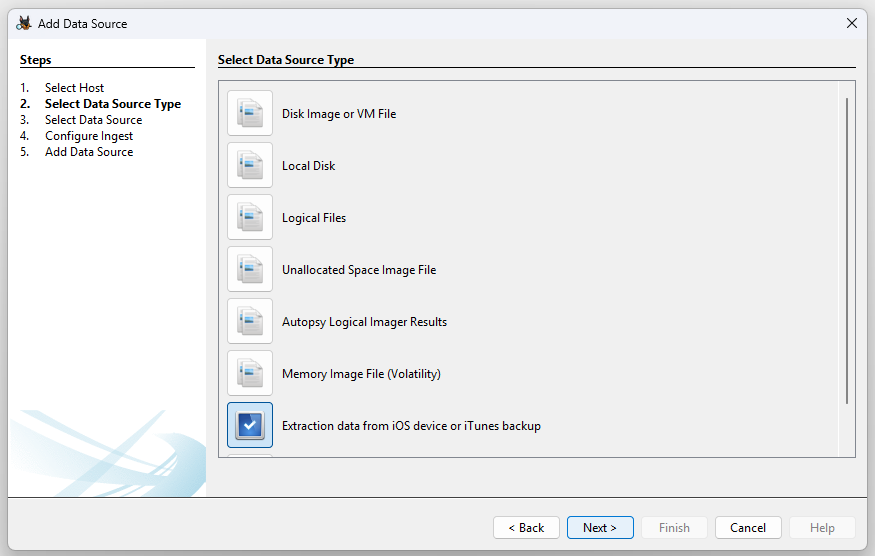
To dig deeper, I use Autopsy with the iOSDeviceDataExtractor plugin, which rebuilds the iOS filesystem layout from the backup so it can then be analyzed with Autopsy’s iOS Analyzer module.
When creating the data source, I select the source type provided by the plugin and click next.
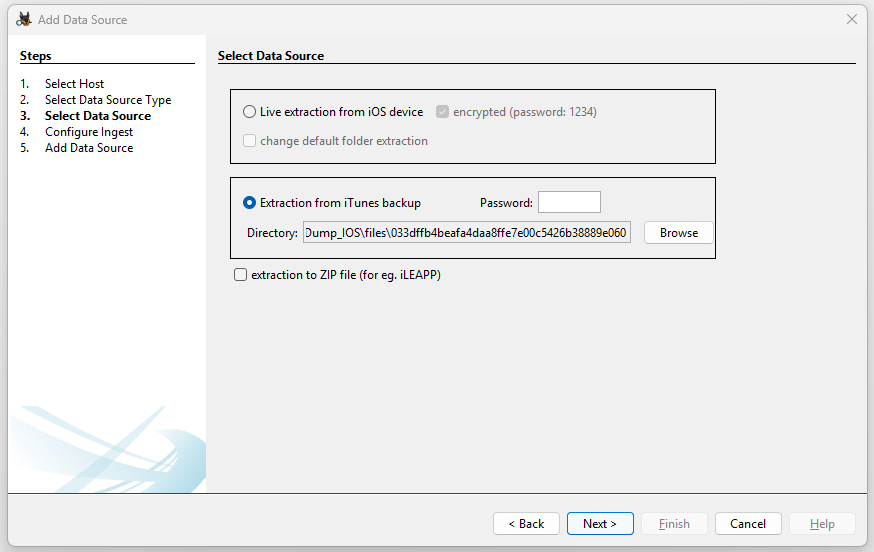
Then I select the backup folder:
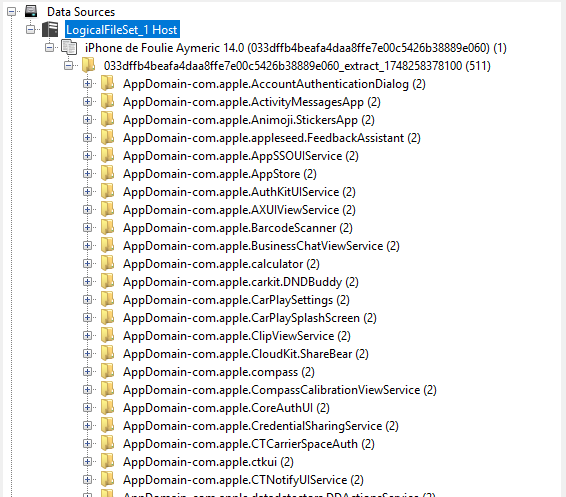
After finishing the wizard, Autopsy has rebuilt the iOS file paths from the backup folder:
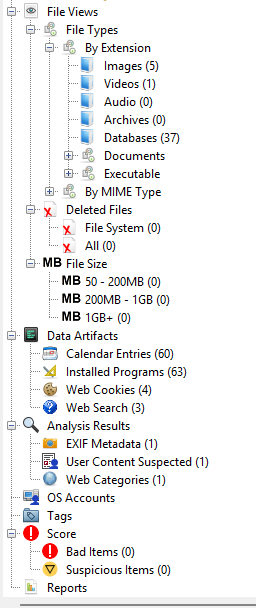
Autopsy also extracts some information on its own, including the browsing history:
Wi-Fi network history
Autopsy did not manage to extract the known Wi-Fi networks, so this needs to be found manually. By querying the backup’s main database, Manifest.db, we can find the files related to the network configuration:
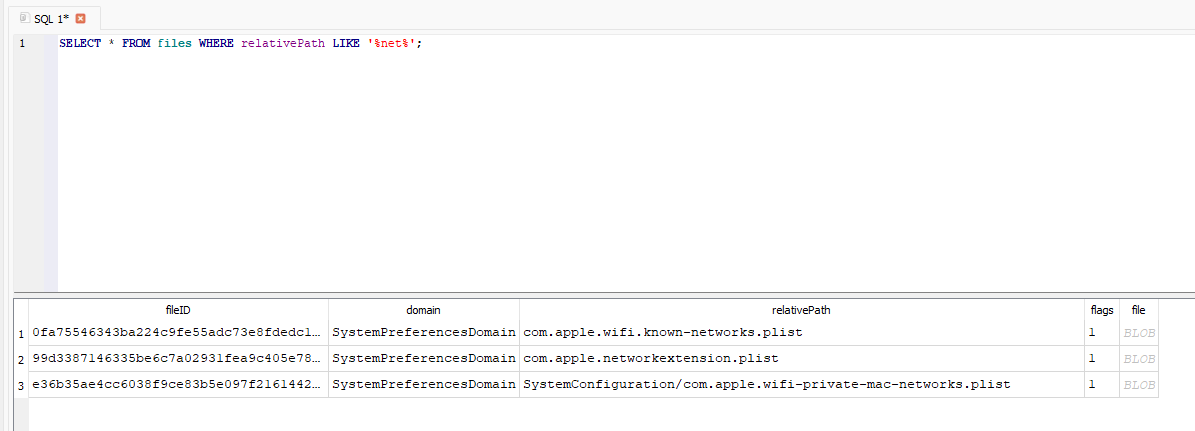
This gives us the fileID of the known-networks database, which we can then read like this:
 1$ plistutil -i 0f/0fa75546343ba224c9fe55adc73e8fdedc1029c3
 2<?xml version="1.0" encoding="UTF-8"?>
 3<!DOCTYPE plist PUBLIC "-//Apple//DTD PLIST 1.0//EN" "http://www.apple.com/DTDs/PropertyList-1.0.dtd">
 4<plist version="1.0">
 5<dict>
 6        <key>wifi.network.ssid.Galaxy S22+9974</key>
 7        <dict>
 8                <key>AddReason</key>
 9                <string>WiFi Settings</string>
10                <key>Hidden</key>
11                <false/>
12                <key>CaptiveProfile</key>
13                <dict>
14                        <key>CaptiveNetwork</key>
15                        <false/>
16                </dict>
17                <key>LowDataMode</key>
18                <false/>
19                <key>SSID</key>
20                <data>
21                R2FsYXh5IFMyMis5OTc0
22                </data>
23                <key>JoinedByUserAt</key>
24                <date>2025-03-17T22:47:05Z</date>
25                <key>__OSSpecific__</key>
26                <dict>
27                        <key>networkUsage</key>
28                        <real>1653.5564478635788</real>
29                        <key>BSSID</key>
30                        <string>f6:60:21:47:7b:24</string>
31                        <key>AP_MODE</key>
32                        <integer>2</integer>
33                        <key>CHANNEL</key>
34                        <integer>1</integer>
35                        <key>networkKnownBSSListKey</key>
36                        <array>
37                                <dict>
38                                        <key>CHANNEL</key>
39                                        <integer>1</integer>
40                                        <key>lastRoamed</key>
41                                        <date>2025-03-13T10:46:28Z</date>
42                                        <key>BSSID</key>
43                                        <string>f6:60:21:47:7b:24</string>
44                                        <key>CHANNEL_FLAGS</key>
45                                        <integer>10</integer>
46                                </dict>
47                        </array>
48                        <key>prevJoined</key>
49                        <date>2025-03-13T07:55:30Z</date>
50                        <key>WiFiNetworkAttributeIsMoving</key>
51                        <false/>
52                        <key>WiFiNetworkAttributeProminentDisplay</key>
53                        <true/>
54                        <key>WiFiNetworkAttributeIsKnown</key>
55                        <true/>
56                        <key>BEACON_PROBE_INFO_PER_BSSID_LIST</key>
57                        <array>
58                                <dict>
59                                        <key>BSSID</key>
60                                        <string>f6:60:21:47:7b:24</string>
61                                        <key>OTA_SYSTEM_INFO_SENT</key>
62                                        <false/>
63                                        <key>OTA_SYSTEM_INFO_BEACON_ONLY_SENT</key>
64                                        <true/>
65                                </dict>
66                        </array>
67                        <key>DiagnosticsBssEnv</key>
68                        <integer>1</integer>
69                        <key>WiFiNetworkPasswordModificationDate</key>
70                        <date>2025-03-13T07:48:18Z</date>
71                </dict>
72                <key>JoinedBySystemAt</key>
73                <date>2025-03-13T10:46:28Z</date>
74                <key>SupportedSecurityTypes</key>
75                <string>WPA2 Personal</string>
76                <key>AddedAt</key>
77                <date>2025-03-13T07:48:18Z</date>
78                <key>UpdatedAt</key>
79                <date>2025-03-17T22:47:05Z</date>
80        </dict>
81</dict>
82</plist>
This gives us the first piece of information: the SSID the user was connected to, Galaxy S22+9974.
Malicious URL
Back in Autopsy, under “Data Artifacts” then “Web Search”, we find the site the user searched for on their phone:
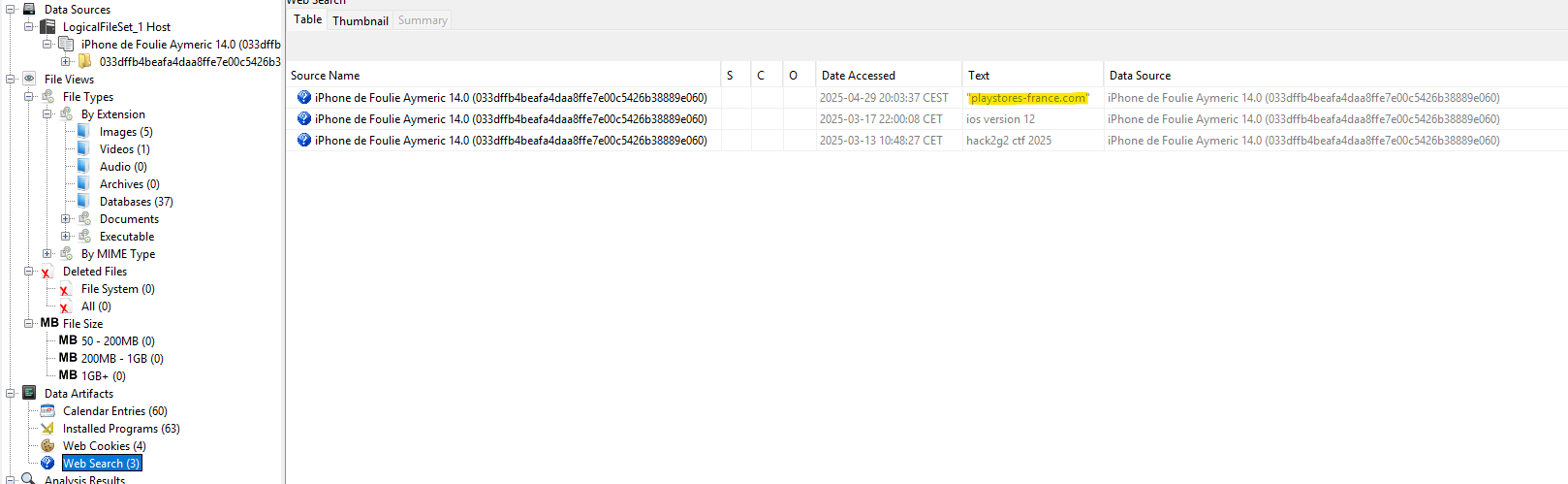
This gives us the second piece of information, the URL the user should have typed directly into their browser: playstores-france.com.
Identifying the AS and the malware family
From this URL, we now need to find the name of the AS it belongs to and the malware family it delivers. First, we resolve the domain to an IP with dig:
 1$ dig @8.8.8.8 playstores-france.com
 2
 3; <<>> DiG 9.18.30-0ubuntu0.24.04.2-Ubuntu <<>> @8.8.8.8 playstores-france.com
 4; (1 server found)
 5;; global options: +cmd
 6;; Got answer:
 7;; ->>HEADER<<- opcode: QUERY, status: NOERROR, id: 18431
 8;; flags: qr rd ra; QUERY: 1, ANSWER: 1, AUTHORITY: 0, ADDITIONAL: 1
 9
10;; OPT PSEUDOSECTION:
11; EDNS: version: 0, flags:; udp: 4096
12; COOKIE: e6fd8145269cd2fb9d89a9e46834542ac096accccec4f7bd (good)
13;; QUESTION SECTION:
14;playstores-france.com.         IN      A
15
16;; ANSWER SECTION:
17playstores-france.com.  21569   IN      A       91.212.166.21
18
19;; Query time: 9 msec
20;; SERVER: 8.8.8.8#53(8.8.8.8) (UDP)
21;; WHEN: Mon May 26 13:44:43 CEST 2025
22;; MSG SIZE  rcvd: 94
With this IP, we can look up more information using a service like ipinfo.io:
 1$ curl ipinfo.io/91.212.166.21
 2{
 3  "ip": "91.212.166.21",
 4  "city": "Saint Petersburg",
 5  "region": "St.-Petersburg",
 6  "country": "RU",
 7  "loc": "59.9386,30.3141",
 8  "org": "AS198953 Proton66 OOO",
 9  "postal": "195213",
10  "timezone": "Europe/Moscow",
11  "readme": "https://ipinfo.io/missingauth"
12}
The IP belongs to the AS Proton66.
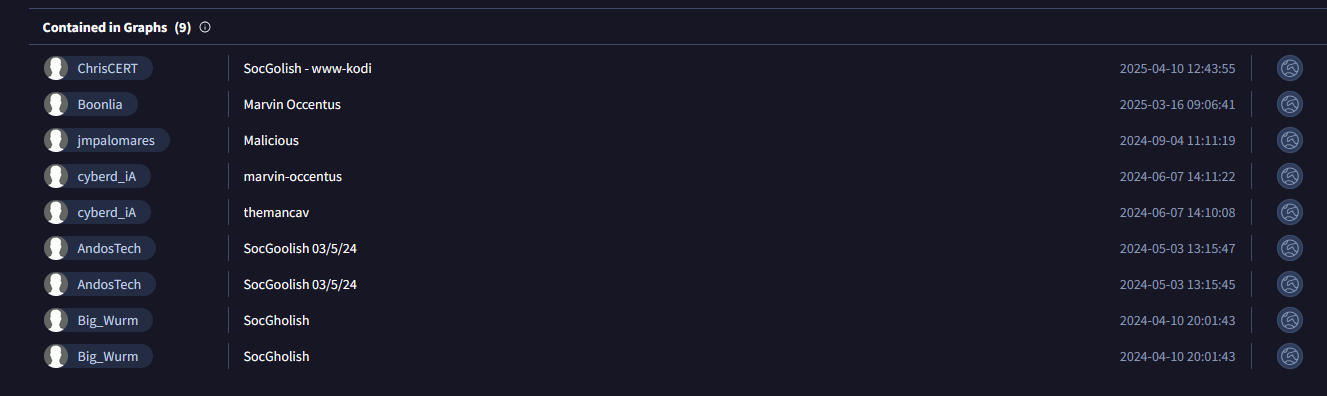
Now that we have this third piece of information, we still need to find which malware family this AS distributes. The first idea is to search for the IP on VirusTotal, which immediately flags it as malicious:

Browsing the “Community” tab, several comments reference the SocGholish malware, apparently delivered by servers hosted on this AS.
Flag
We now have every piece of information required:
- SSID: Galaxy S22+9974
- URL: playstores-france.com
- AS: Proton66
- Malware: SocGholish
1interiut{Galaxy S22+9974:playstores-france.com:proton66:socgholish}