This challenge is split into three parts of different difficulty:
- The first one is Medium
- The second and third ones are Easy
For the first part, we need to find the following information from a network capture:
- The name of the web application used to interact with their remote server
- Username
- Password
- IP of the remote server
- The associated domain name
- Hostname
Analysis
Part 1: Recovering the session credentials
Opening the network capture, we notice a lot of HTTP packets. The interesting part starts at frame n°7937, when the client machine makes a DNS request for ec2-3-95-168-43.compute-1.amazonaws.com. A few lines later, we see HTTP exchanges between the client machine and this server, 3.95.168.43. In these exchanges, we notice a reference to an application called shellinabox.

This application is used to interact with a server through a terminal accessible over the web. Since the application is not protected by SSL/TLS, we can read all the data exchanged between the client and the web server in both directions.
At this point, two TCP streams stand out:
- tcp.stream eq 96 => the stream where the client sends the keys it presses
- tcp.stream eq 101 => the stream where the server sends the data to display on the client’s web terminal
Following the HTTP frames of the second stream, we can see everything displayed on the terminal. At the start of the stream, we find one of the pieces of information we are looking for: the server’s hostname.
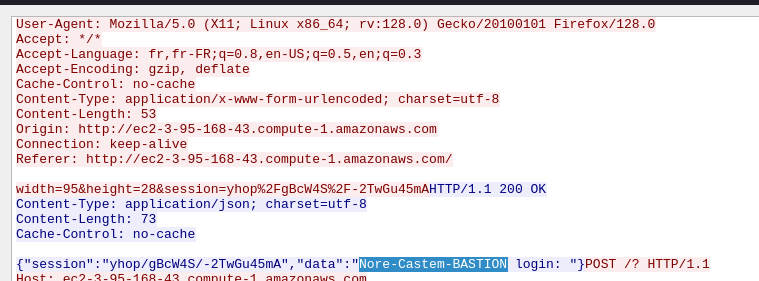
The only information still missing is the credentials (username and password). Going through this stream, we see that the data returned by the server in the “data” field corresponds to the letters typed by the user in the terminal.
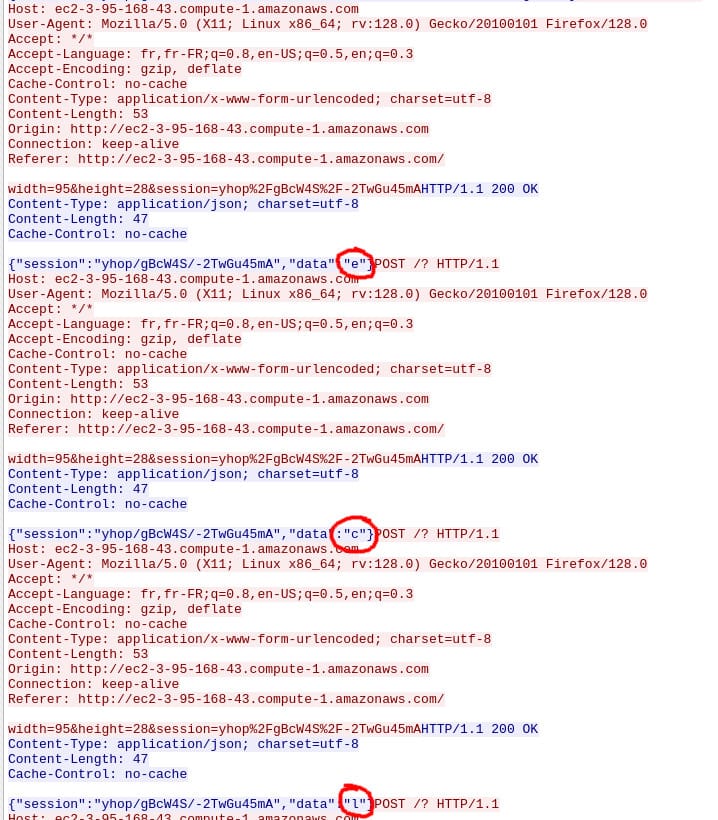
Putting these letters one after the other gives us the username: eclide. Then, by reading the key codes pressed by the user in stream 96, we reconstruct the password: D7i_#!posil!.
To summarize, we have now gathered all this information:
- Web application name: shellinabox
- Username: eclide
- Password: D7i_#!posil!
- Remote server IP: 3.95.168.43
- Associated domain name: ec2-3-95-168-43.compute-1.amazonaws.com
- Hostname: Nore-Castem-BASTION
Putting all this information together in the right format gives us the first flag.
FLAG 1/3:
1interiut{shellinabox_eclide_D7i_#!posil!_3.95.168.43_ec2-3-95-168-43.compute-1.amazonaws.com_Nore-Castem-BASTION}
Part 2: Recovering the file read by the user
For the second part, we need to find the name and content of a file the user read on the remote server.
Going through stream 96, we see that the user types the following keys:
1c a t [Space] v a [Tab] [Enter]
By cross-referencing the keys pressed by the user with the display data sent back by the server, we can reconstruct exactly what happened.
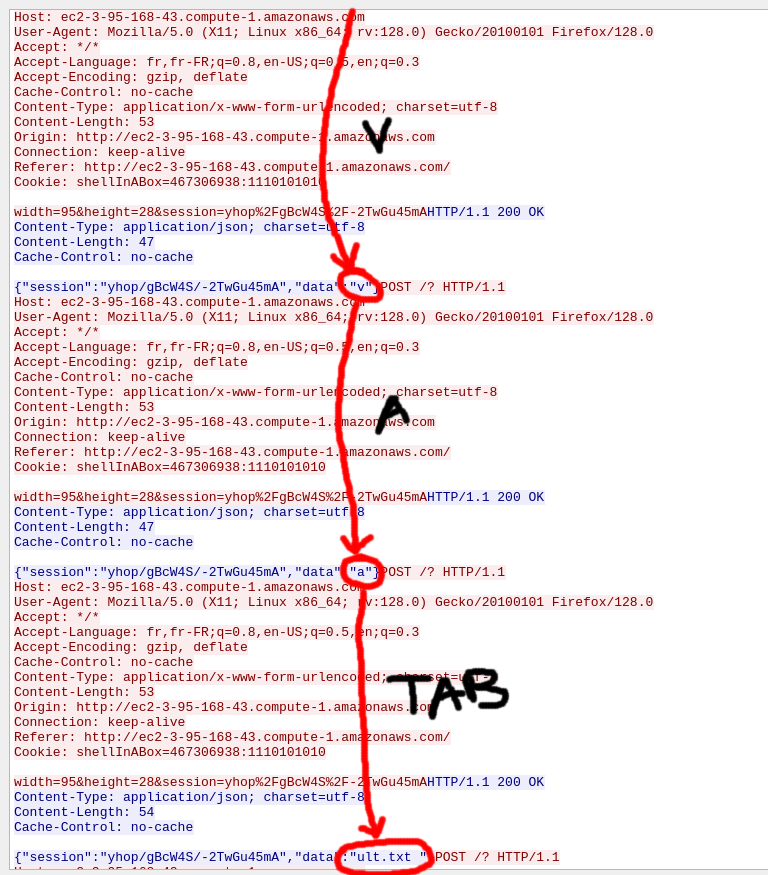
This gives us the file name: vault.txt. Right after the file name is completed, we find the data “\r\n”, corresponding to a line break (the Enter key). Then, in the server’s next response, we find the file’s content along with the prompt for the next command.

The content is: Dk_Dc!#dsq950.
FLAG 2/3:
1interiut{vault.txt_Dk_Dc!#dsq950}
Part 3: Decrypting the LUKS container
For this third and last part, we are given a “suspicious” file. Running file on it shows that it is a LUKS encrypted volume:
1$ file suspicious_data
2suspicious_data: LUKS encrypted file, ver 2 [, , sha256] UUID: 6b17d5b0-16e9-4ae0-af82-d0becd1d13bd
To mount this file, I first use these commands:
1sudo losetup --find --show suspicious_data
2sudo cryptsetup luksOpen /dev/loop17 decrypted_suspicious
At this point, a passphrase is requested. Reusing the information found in the previous part, I try the content of “vault.txt” as the passphrase: Dk_Dc!#dsq950.
This passphrase works without any error. I can then mount the volume into a folder, for example /mnt/suspicious:
1sudo mkdir -p /mnt/suspicious
2sudo mount /dev/mapper/decrypted_suspicious /mnt/suspicious
Inside this folder, there is only one file, “chat.jpg”, which looks harmless at first glance:
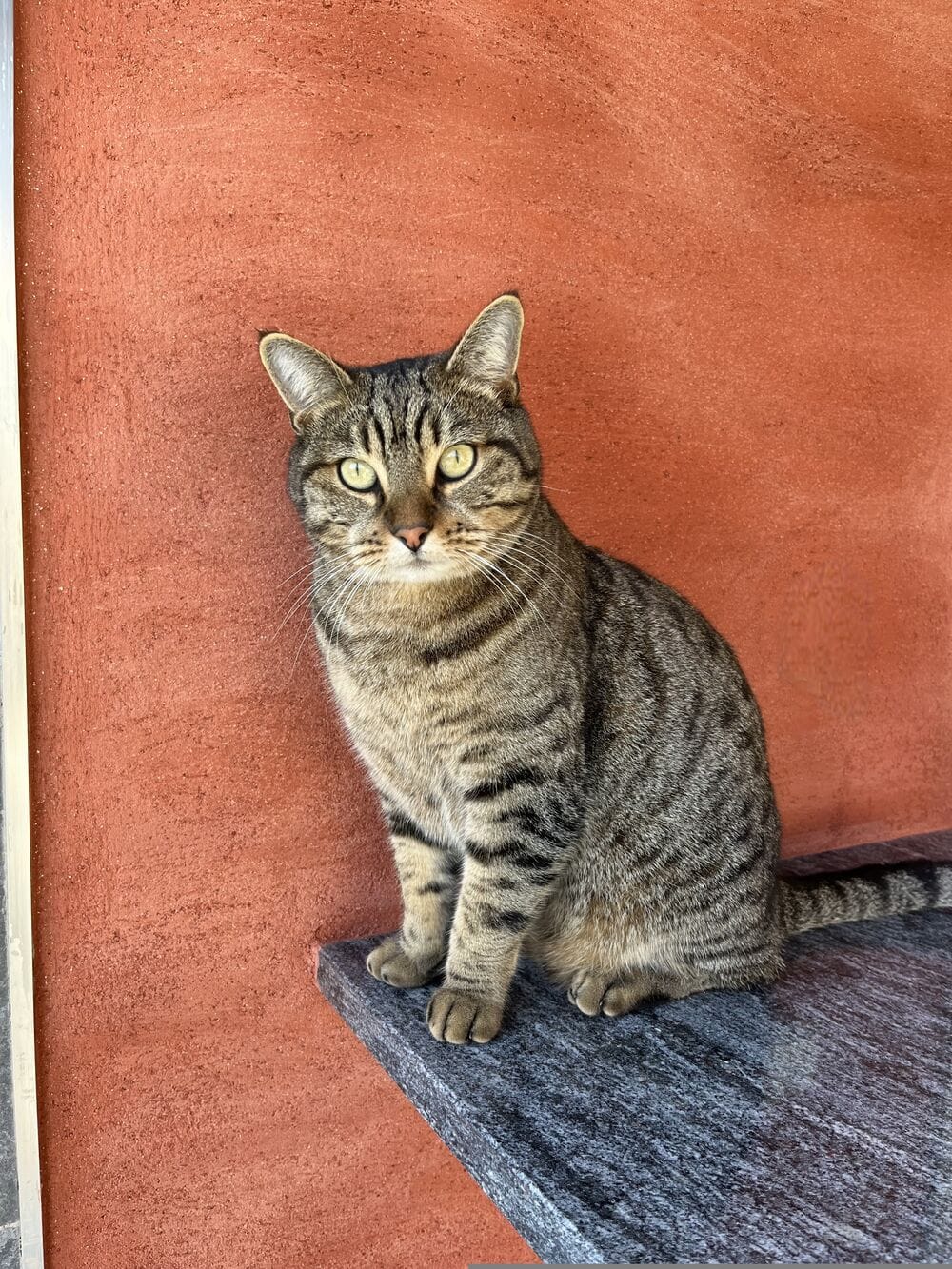
Running exiftool on the image reveals the flag:
 1$ exiftool chat.jpg
 2ExifTool Version Number         : 12.40
 3File Name                       : chat.jpg
 4Directory                       : .
 5File Size                       : 4.2 MiB
 6File Modification Date/Time     : 2025:05:16 10:23:33+02:00
 7File Access Date/Time           : 2025:05:25 13:09:58+02:00
 8File Inode Change Date/Time     : 2025:05:16 10:23:33+02:00
 9File Permissions                : -rw-r--r--
10File Type                       : JPEG
11File Type Extension             : jpg
12MIME Type                       : image/jpeg
13Current IPTC Digest             : f3ccc7862d516e90ea39811bf6850c8e
14Copyright Notice                : Bien joué ! interiut{QU1_U7i1i53_3NC0r3_sH311iN80XD?}
15Application Record Version      : 4
16Image Width                     : 3024
17Image Height                    : 4032
18Encoding Process                : Baseline DCT, Huffman coding
19Bits Per Sample                 : 8
20Color Components                : 3
21Y Cb Cr Sub Sampling            : YCbCr4:2:0 (2 2)
22Image Size                      : 3024x4032
23Megapixels                      : 12.2
FLAG 3/3:
1interiut{QU1_U7i1i53_3NC0r3_sH311iN80XD?}
Flags
1interiut{shellinabox_eclide_D7i_#!posil!_3.95.168.43_ec2-3-95-168-43.compute-1.amazonaws.com_Nore-Castem-BASTION}
2interiut{vault.txt_Dk_Dc!#dsq950}
3interiut{QU1_U7i1i53_3NC0r3_sH311iN80XD?}